What is feature detection?
Extract compact, distinctive structures from images
Instead of comparing entire images pixel-by-pixel, extract a small set of stable, repeatable structures that uniquely characterize the image. These are used for matching, recognition, and reconstruction.
General CV pipeline
Input Images
Feature Detection
Description & Matching
Object Detection & Recognition
Four common feature types

Edges

Pixels with strong intensity change
Indicate object boundaries
Detected with Sobel, Canny, LoG
1D structure — curve in image

Corners (Interest Points)

Strong intensity change in MULTIPLE directions
Intersection of 2+ edges
Stable under translation, rotation, illumination
Most informative point feature

Blobs / Regions

Locally homogeneous regions
Distinct from surroundings
Too smooth for corner detectors
Detected with DoG, LoG

Ridges

Curves at local intensity maxima/minima
Road networks, blood vessels
Linear structures in images
Used in medical imaging
Real-world feature examples
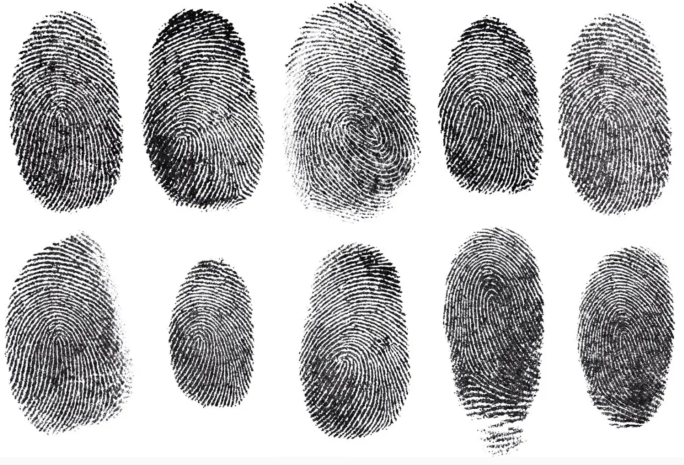
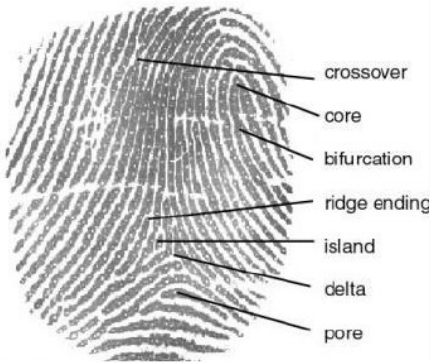
Fingerprint minutiae
11 minutiae types considered: Ridge ending, Bridge, Crossover, Dot, Bifurcation, Hook, Delta, Enclosure, Core, Island, Pore. Instead of comparing full fingerprints pixel-by-pixel, minutiae-based algorithms extract only these local structural points. This compact representation is highly robust to rotation, distortion, and noise.
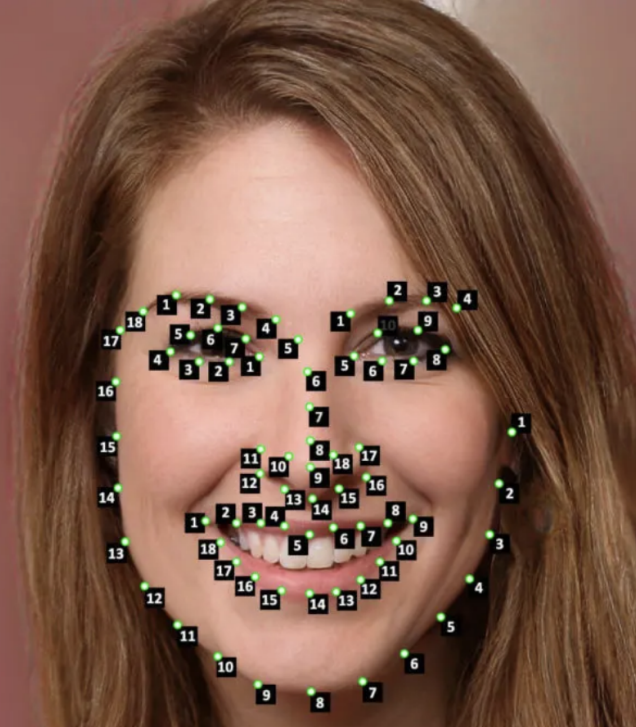
Facial landmarks
Eye corners, nose tip, mouth boundaries, jawline intersections. Geometric distances between landmark locations form a compact numerical face representation. This geometric representation is robust against variations in image resolution, illumination conditions, and facial expressions.
Why features instead of full images?
Compact — fewer points than pixels
Stable — repeatable under viewpoint/illumination changes
Discriminative — unique enough to enable matching
Efficient — faster matching and recognition
Robust — works even with partial occlusion
Applications
Object detection
YOLO and CNN-based architectures internally learn feature maps automatically, but conceptually rely on extracting the same stable, informative structures.
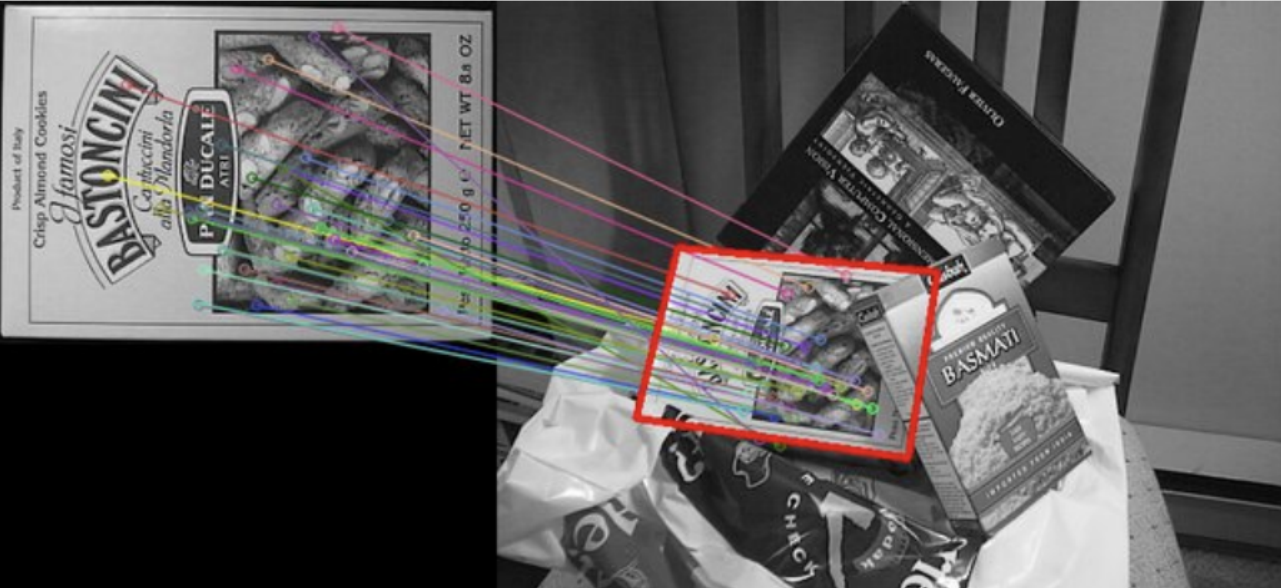
Image matching
Panorama stitching, stereo vision, finding corresponding points across multiple images.
Tracking
Track feature points across video frames.
Scene reconstruction
3D structure from motion (SfM) and camera motion estimation.
Biometrics
Fingerprint, face, and iris recognition.
ROI localization
Find regions of interest (ROIs) for further localized processing.
Deep Learning Connection: While classical pipelines manually engineer feature detectors, modern systems like CNNs and YOLO learn features from data. However, they conceptually share the same foundation: extracting stable, repeatable, and scale-robust structures for downstream tasks.
The key insight: shift a window, measure change
If shifting a window in ANY direction causes large intensity change → it's a corner
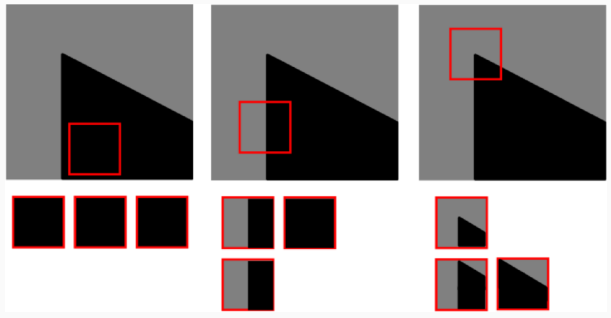
Place a small window at a pixel. Shift it slightly up, down, left, right. Measure how much the pixel values change (SSD). The type of region determines what you see.
Three region types — the fundamental trichotomy

Flat region

Uniform intensity everywhere
Shifting in ANY direction → small SSD
No change in all directions
Min SSD over all directions = SMALL
NOT an interest point
Example: clear sky, smooth wall

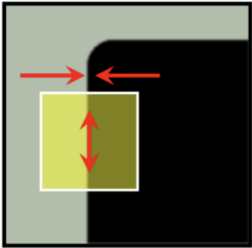
Edge region

Strong change in ONE direction only
Shift ⊥ to edge → large SSD
Shift ∥ to edge → small SSD
No change along the edge direction
Min SSD = SMALL (along edge)
NOT a corner
Example: boundary lines, straight edges

Corner region

Strong change in ALL directions
Shift in ANY direction → large SSD
Significant change in all directions with small shift
Min SSD over all directions = LARGE
IS a corner → interest point!
Example: building corner, checkerboard
Choosing Interest Points (Meeting Analogy)
Like choosing a meeting spot for a friend: you select a location that is easy to identify, visually distinctive, and unlikely to be confused with other locations. Typical interest points in images include:
Corners: Points where intensity changes significantly in multiple directions.
Peaks and valleys: Points where intensity rises or falls sharply.

These locations correspond to regions where image intensity varies significantly in multiple directions, allowing points to be detected and matched reliably across multiple images.
Why corners and not edges? Edges tell you WHERE along an edge something is perpendicular-wise, but not WHERE along the edge lengthwise — this is the "aperture problem". Corners are fully localized in both directions.
Properties of good corners
Translation invariant — detectable regardless of where in image
Rotation stable — a corner stays a corner when rotated
Illumination robust — moderate lighting changes don't destroy them
Informative — carry strong geometric information
Repeatable — same physical corner found in different images
Where corners appear in natural scenes
High-corner scenes
Buildings and architecture, chessboard patterns, text, road intersections, manufactured objects with sharp edges.
Low-corner scenes
Sky, water, smooth textures, gradual gradients. These are dominated by flat regions and smooth edges — harder to match reliably.
Algorithm overview
1
Select a candidate pixel (m, n)
2
Place a square window W centered at (m, n)
3
Shift the window by 1 pixel in 4 directions: (1,0), (−1,0), (0,1), (0,−1)
4
Compute SSD for each shift direction
5
Take the MINIMUM SSD across all directions → F_{m,n}
6
Mark as corner if F_{m,n} is a local maximum AND exceeds threshold T
Mathematical formulation
Sum of Squared Differences (SSD) for offset $(x,y)$: \[E_{m,n}(x,y) = \sum_{(u,v) \in \mathcal{W}} \left[ I(m+u, n+v) - I(m+x+u, n+y+v) \right]^2\] Where: • \(\mathcal{W}\) is the local window centered around pixel \((m,n)\). • \(I\) is the pixel intensity function. Moravec Corner Response: \[F_{m,n} = \min_{(x,y) \in \mathcal{D}} E_{m,n}(x,y)\] Discrete Shift Direction Set $\mathcal{D}$: \[\mathcal{D} = \{ (1,0), (-1,0), (0,1), (0,-1) \}\] Corresponding to shifts of one pixel in the four principal directions: right, left, down, up respectively. Corner Selection Criterion: A pixel \((m,n)\) is selected as a corner if: 1. \(F_{m,n}\) is a local maximum in its neighborhood (to ensure precise localization). 2. \(F_{m,n} > T\) (where \(T\) is a predefined threshold). \[\text{Corner at } (m,n) \iff F_{m,n} \text{ is locally maximal } \land F_{m,n} > T\]
Interpreting F_{m,n}

F small

At least one shift direction has low SSD
Region is flat OR edge
NOT a corner

F medium

Some directions have higher SSD
Likely an edge or weak structure
Below threshold → not selected

F large (local max)

EVERY direction has large SSD
Even the minimum SSD is large
CORNER detected!
Why minimum? Taking the minimum ensures that ALL directions have significant change. An edge would have one direction with near-zero SSD, so its minimum would be small. Only a true corner has a large minimum.
Limitations of Moravec — and why Harris was developed
Limitation Cause Harris fix
Not rotation invariantOnly 4 discrete shift directionsUses gradient structure tensor (all directions)
Sensitive to noiseCompares raw pixel intensities directlyGaussian weighting in window
Edges detected as cornersMinimum over only 4 directions may miss edge parallel to shiftEigenvalue analysis distinguishes edge/corner/flat
Poor localizationNo Gaussian weighting → all pixels in window equalCenter pixels weighted more
Anisotropic responseResponse depends on chosen shift directionsContinuous gradient-based formulation
Moravec vs Harris — quick compare

Moravec (this lecture)

4 discrete shift directions
Uniform window weights
Sensitive to noise
NOT rotation invariant
Simple to understand

Harris (next lecture)

Continuous gradient-based (all directions)
Gaussian window weights
More noise robust
Rotation invariant
More accurate localization
SSD calculator — Moravec detector step by step
Enter a 4×4 image patch. The highlighted center 2×2 is the window W. Compute SSD for each of the 4 shift directions and find the Moravec corner response F.
Image patch (4×4) — pixel values
Preset pattern
SSD Formula Breakdown & Example Walkthrough
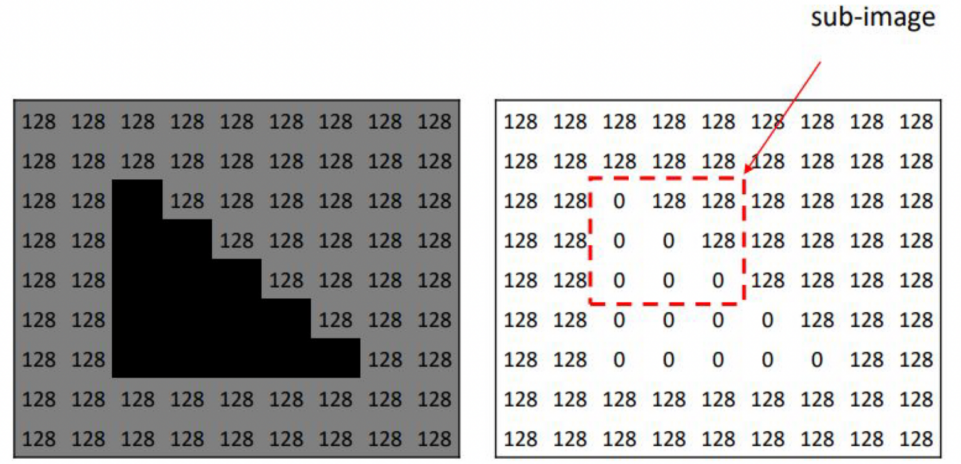
Illustrative Example from Lecture Content
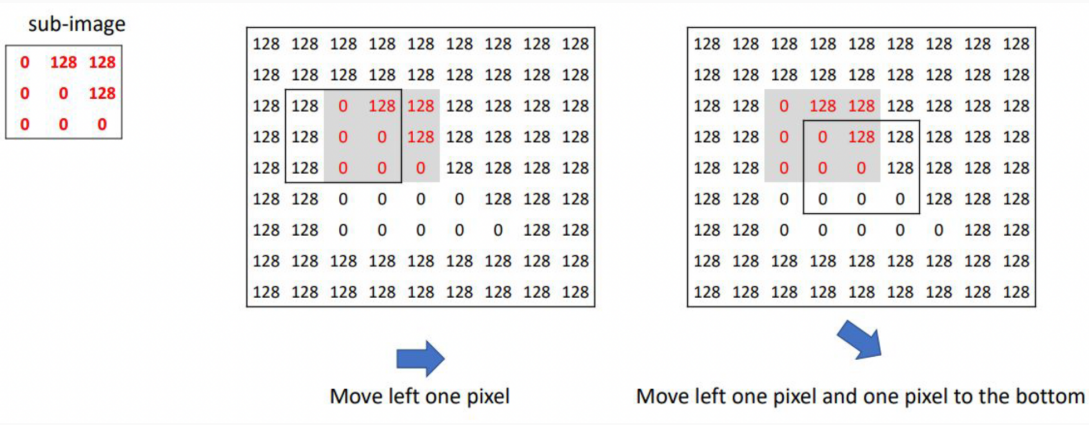
Consider a simplified image where background pixels have an intensity value of 128 (gray) and object pixels have a value of 0 (black). Let's trace how the Moravec detector evaluates a candidate pixel step-by-step:

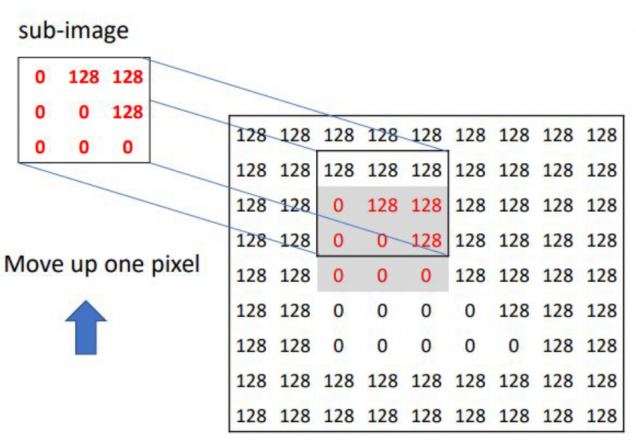
1. Selecting the Reference Sub-Image

The detector places a small sliding window \(W\) (e.g., $2 \times 2$) centered at the candidate pixel location \((m,n)\) to capture the local intensity structure:
Original Window \(W\) at \((m,n)\): \(I(m,n) = 0\) \(I(m,n+1) = 128\) \(I(m+1,n) = 128\) \(I(m+1,n+1) = 128\)

2. Shift Up by One Pixel: \((x,y) = (0, -1)\)

The sub-image is shifted one pixel upward and compared with the original window to evaluate intensity variation.
Shifted Window at \((m, n-1)\): \(I(m, n-1) = 128\) \(I(m, n) = 0\) \(I(m+1, n-1) = 128\) \(I(m+1, n) = 128\) \[\text{SSD} = (0 - 128)^2 + (128 - 0)^2 + (128 - 128)^2 + (128 - 128)^2\] \[\text{SSD} = 16384 + 16384 + 0 + 0 = 32768 \quad (\text{Large!})\]
A large SSD value indicates strong intensity variation when shifting upward, contributing evidence toward detecting a corner.

3. Horizontal, Vertical, and Diagonal Shifts

The process is repeated for shifts in other directions. Suppose we shift right:
Shifted Window at \((m, n+1)\) (Right shift): \(I(m, n+1) = 128\) \(I(m, n+2) = 128\) \(I(m+1, n+1) = 128\) \(I(m+1, n+2) = 128\) \[\text{SSD} = (0 - 128)^2 + (128 - 128)^2 + (128 - 128)^2 + (128 - 128)^2\] \[\text{SSD} = 16384 + 0 + 0 + 0 = 16384 \quad (\text{Large!})\]
If the window is shifted in a direction that aligns perfectly with an edge (e.g., shifting parallel to an edge), the pixel intensities will not change, resulting in a small SSD. Only when the intensity variation remains large for all tested shifts (meaning the minimum SSD \(F_{m,n}\) is still high) is the pixel classified as a corner.

Visual Cheat Sheet Summary
1-Image Summary
50-Question Practice Quiz
This comprehensive practice quiz contains 50 multiple-choice questions loaded directly from the lecture database.
25-Question True/False Practice
Answer each statement, reveal optional hints, and review the explanation after submitting.
Figures Extracted from the Original Lecture Document
These figures are preserved in their original document order as a complete visual reference. Captions identify the source part and figure number; explanatory text remains in the study-guide sections.
Lecture 7 — original figure 1
Lecture 7 — original figure 2
Lecture 7 — original figure 3
Lecture 7 — original figure 4
Lecture 7 — original figure 5
Lecture 7 — original figure 6
Lecture 7 — original figure 7
Lecture 7 — original figure 8
Lecture 7 — original figure 9
Lecture 7 — original figure 10
Lecture 7 — original figure 11