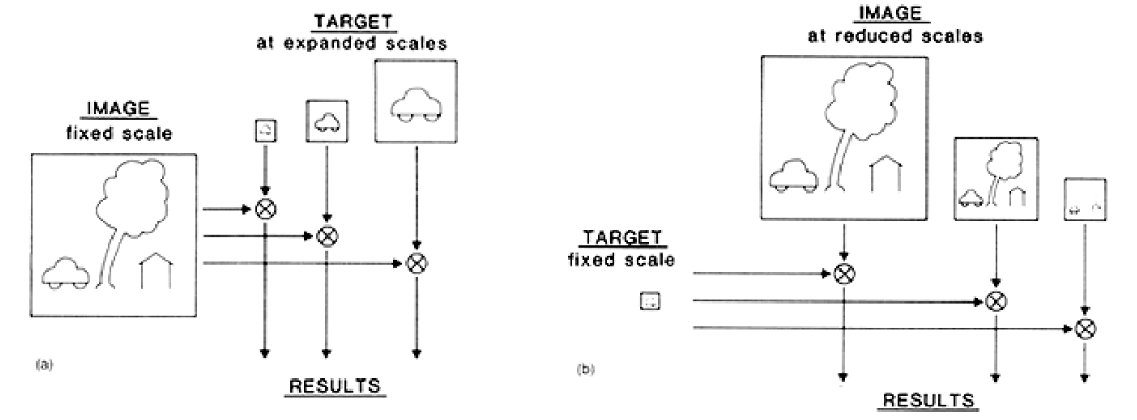
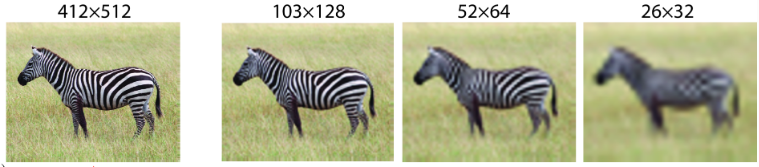
Suppose we want to detect a bird in an image using a small bird template. Because the bird may appear at different scales depending on its distance from the camera, a single-scale template match will fail.
Two Main Approaches to Multi-Scale Search: 1. Scale the target image: Perform template matching against multiple progressively scaled versions of the target scene.
2. Scale the template image: Compare multiple resized versions of the template against the original, high-resolution target image.
Image pyramids allow us to perform these searches efficiently by organizing representation scale-by-scale.
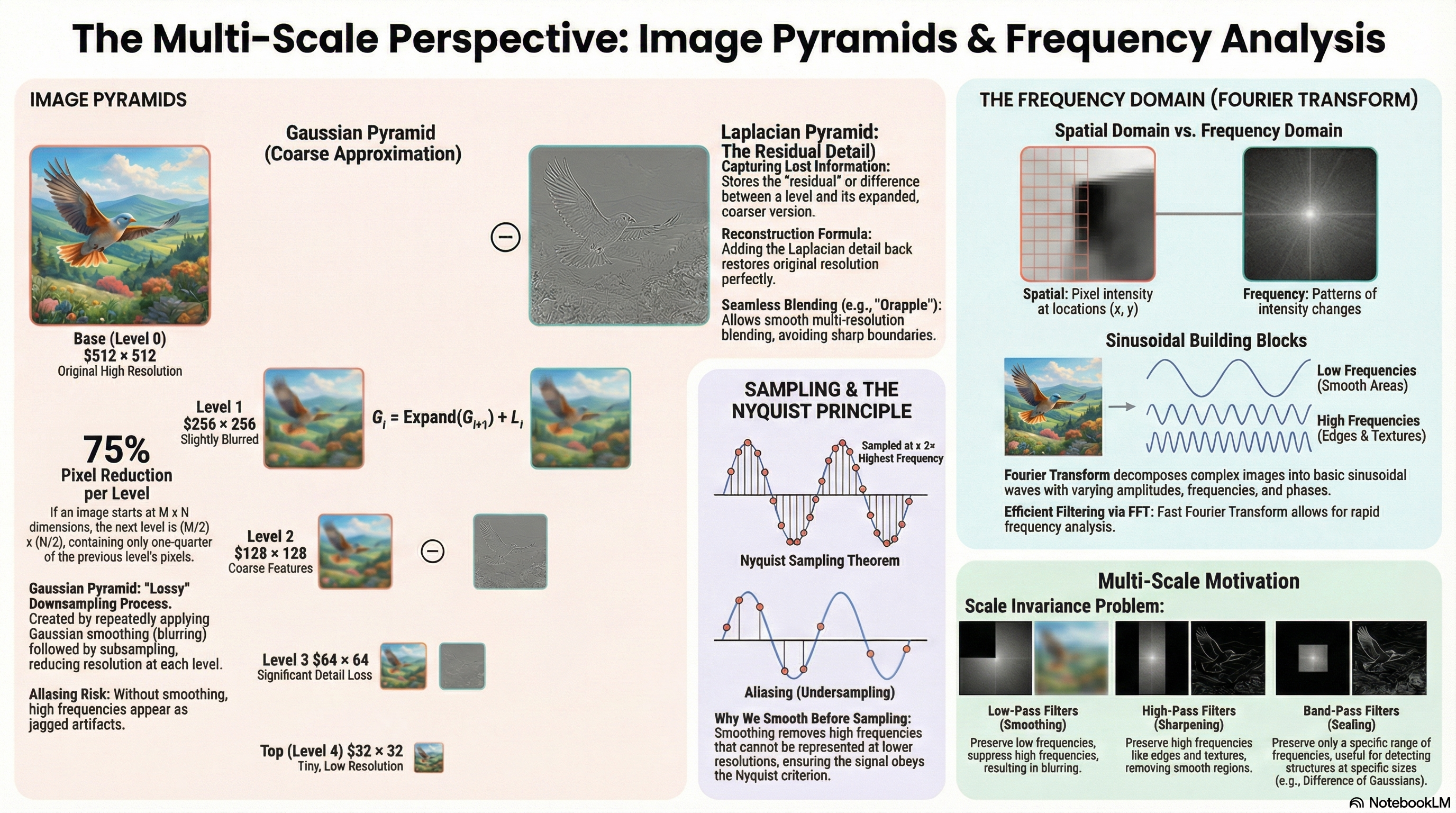
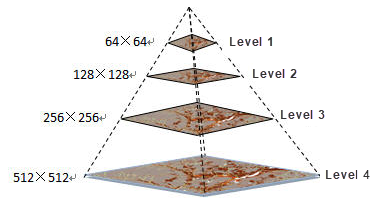
Level 0 (base) — original image M×N. Highest resolution.
Key storage fact: Each level has ¼ the pixels of the level below (halved in both dimensions). A full pyramid takes only 4/3 × the original storage (geometric series sum: $1 + 1/4 + 1/16 + ... = 4/3 \approx 1.333$).
Two fundamental pyramid operations
Reduce (going UP the pyramid)
1. Gaussian smooth (low-pass filter) to remove high frequencies.
2. Subsample by a factor of 2 (take every 2nd row and column).
Result: half the width and height.
Must smooth BEFORE subsampling to prevent aliasing artifacts.
Expand (going DOWN the pyramid)
1. Double the width and height (upsample).
2. Insert zeros between known pixel values.
3. Apply an interpolating low-pass filter to estimate missing values.
Result: coarser approximation at twice the resolution.
Gaussian pyramid — construction
Algorithm:
1. Start with original image G₀
2. Apply Gaussian blur to G_l
3. Subsample every 2nd row and column → G_{l+1}
4. Repeat until minimum resolution reached
Properties:
• Each level is a blurred, downsampled version of the level below
• Higher levels = coarser / lower resolution
• Lossy — smoothing discards high-freq detail permanently
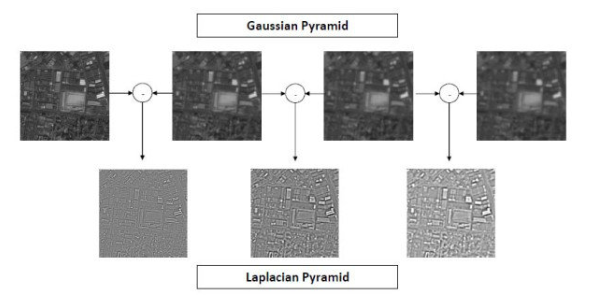
Gaussian vs Laplacian pyramid — quick compare
Gaussian pyramid
Stores smoothed + downsampled images
Compact multi-scale representation
Lossy — cannot reconstruct original exactly
Gives coarse approximation at each scale
Laplacian pyramid
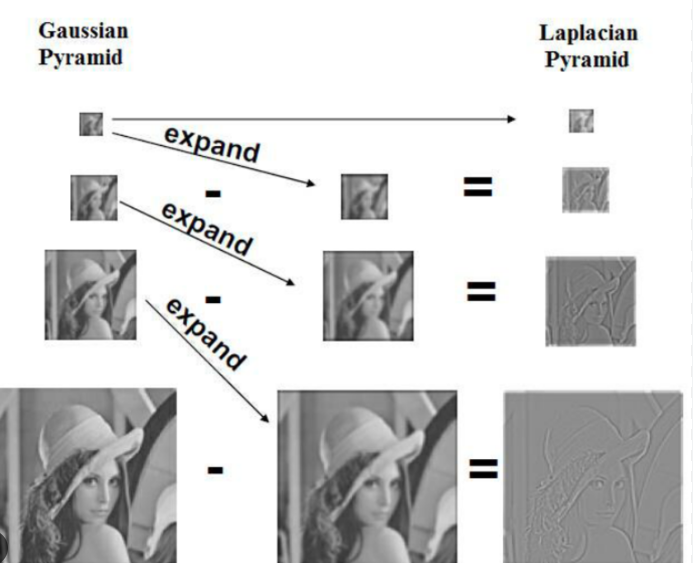
Stores DIFFERENCE between Gaussian levels
Captures fine detail lost during smoothing
Lossless — exact reconstruction possible
Gives residual / detail at each scale
The core question Laplacian pyramids solve
Can we reconstruct the original image from a Gaussian pyramid?
NO. Smoothing permanently discards fine edges, textures, and sharp transitions. The Laplacian pyramid solves this by storing what was lost at each level as a residual image.
Construction — storing the lost detail
Algorithm:
1. Build the Gaussian pyramid: $G_0, G_1, G_2, \dots, G_n$
2. For each level $l = 0, 1, \dots, n-1$:
a. Expand $G_{l+1}$ to the size of $G_l$: $\text{Expand}(G_{l+1})$
b. Compute the difference: $L_l = G_l - \text{Expand}(G_{l+1})$
c. Store the residual image $L_l$
3. Keep the smallest Gaussian image $G_n$ as the top of the pyramid.
Full Laplacian Pyramid representation: $\{L_0, L_1, L_2, \dots, L_{n-1}, G_n\}$
Where $L_l$ contains the fine spatial details (edges, textures, sharp transitions) present in $G_l$ but missing from the coarser level.
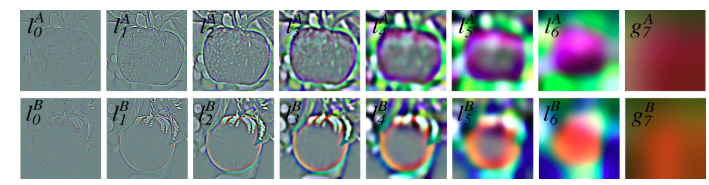
What Laplacian images look like: Edge-like, detail-emphasizing images. Smooth regions → near-zero values. Edges and textures → non-zero values. They look like embossed versions of the original.
Reconstruction — adding back the detail
Reconstruction Equation:
$G_l = \text{Expand}(G_{l+1}) + L_l$
Algorithm (Bottom-Up Reconstruction):
1. Start from the smallest Gaussian image $G_n$ (the top of the pyramid).
2. For each level $l$ from $n-1$ down to $0$:
a. Expand the Gaussian image at level $l+1$: $\text{Expand}(G_{l+1})$
b. Add the residual at level $l$: $L_l$
c. Reconstruct the Gaussian image at level $l$: $G_l = \text{Expand}(G_{l+1}) + L_l$
3. After $n$ steps, recover $G_0$, which is exactly the original image (lossless!).
Connection to DoG
Laplacian pyramid ≈ Difference of Gaussians (DoG)
L_l = G_l − Expand(G_{l+1}) is structurally equivalent to subtracting two Gaussian-smoothed versions at different scales: DoG = G_σ₁ − G_σ₂ where σ₂ > σ₁. Both suppress slowly varying content and emphasize structures that change rapidly (edges, blobs). DoG is used in SIFT for this reason.
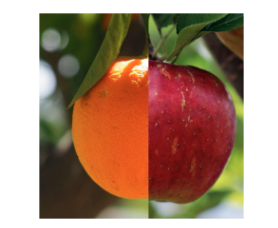
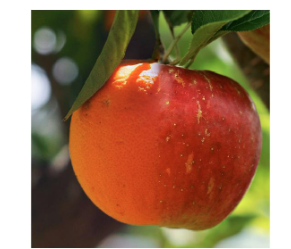
Laplacian pyramid blending — the apple/orange example
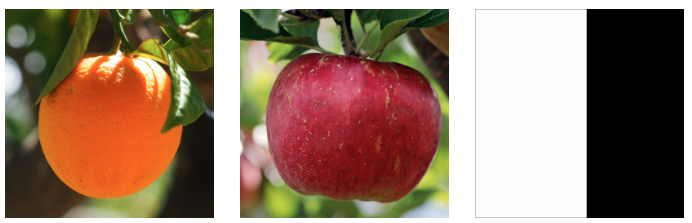
Direct Combination (Sharp Seam)
Combine images directly using a binary mask.
Result: A sharp, highly visible boundary seam.
Unnatural transition: The cut happens abruptly at one pixel location, highlighting contrast and color differences.
Multi-Resolution Blending (Pyramid)
Decompose images into Laplacian pyramids.
Convert mask to Gaussian pyramid (softens seam at lower scales).
Natural transition: Blend level-by-level, then reconstruct the final image.
1
Build Laplacian pyramids for BOTH images (apple and orange).
2
Build a Gaussian pyramid of the binary mask (mask gets smoother and transition zone becomes wider at coarser levels).
3
At each level $l$, blend Laplacian levels using the matching mask level: $B_l = mask_l \cdot LA_l + (1 - mask_l) \cdot LB_l$.
4
Reconstruct the blended pyramid bottom-up to obtain the final seamlessly blended image.
Why pyramid blending works: Low-frequency (coarse) detail is blended over a wide transition zone. High-frequency (fine) detail is blended over a narrow zone. Each scale gets the right amount of blending — no ghosting, no harsh seam.
Uses of Laplacian pyramid
Image compression
Residuals often sparse — encode efficiently
Image blending
Scale-aware seamless compositing
Multi-scale detection
Find structures at different sizes
Denoising
Separate noise from detail by scale
Image fusion
Focus stacking, HDR merging
Feature extraction
Scale-space analysis
What is aliasing?
Sampling too slowly to represent the signal accurately
High-frequency components can't be captured at the lower sampling rate. They "fold back" and appear as incorrect lower-frequency patterns. Result: jagged edges, false patterns, moiré, pixelated textures.
Nyquist sampling theorem
Nyquist Criterion:
\(f_{\text{sampling}} \ge 2 \times f_{\text{max\_signal}}\)
To represent a repeating spatial pattern:
We need at least 2 samples (pixels) per cycle/period of the pattern.
Case Study: Downsampling Zebra Stripes (High Spatial Frequencies)
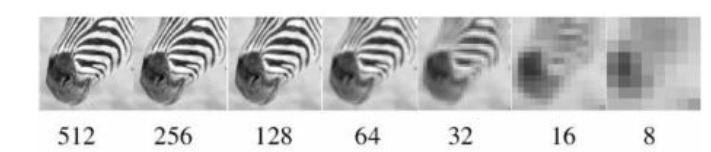
The zebra stripes contain high spatial frequencies because the intensity changes rapidly between black and white. Let's trace how the pattern behaves as we decrease resolution (sample too slowly):
• 512, 256, and 128 pixels: There are enough pixels/samples to represent the stripe details clearly.
• 64 and 32 pixels: The number of pixels becomes smaller, causing the fine stripe patterns to weaken.
• 16 and 8 pixels: The image no longer has enough samples to represent the stripe pattern correctly, violating the Nyquist criterion. The stripes are lost or distorted, producing aliasing (false lower-frequency patterns, Moiré effects, and pixelated textures).
The rule: You must sample at least TWICE the highest frequency in the signal. If you can't sample fast enough, remove the high frequencies FIRST (low-pass filter), then sample. This is exactly what the Gaussian pyramid does.
Why you MUST smooth before subsampling
Subsample without smoothing
High-freq content still in image
Nyquist violated at lower resolution
High freqs appear as false low-freq patterns
Jagged edges, moiré artifacts
Smooth THEN subsample (correct)
Gaussian removes freqs above new Nyquist limit
Remaining content representable at lower res
No aliasing artifacts
Visually stable reduction
Anti-aliasing strategies
Oversampling
Increase the sampling rate
Preserve high-frequency information
Cost: more data, more compute
Used in: supersampling anti-aliasing (SSAA)
Low-pass filtering (practical)
Apply Gaussian before downsampling
Removes problematic high freqs
Some information lost — but stable
Standard approach in image pyramids
Aliasing in real applications
Scenario
What happens
Solution
Image downsampling
Fine textures become moiré patterns
Gaussian blur first
Video frame rate
Wagon wheels appear to spin backward
Higher frame rate (oversample)
3D texture mapping
Shimmering distant surfaces
Mipmapping (pyramid)
Spatial vs frequency domain
Spatial domain
Image = grid of pixel intensities
Each value = brightness at location (x,y)
Filtering = sliding kernel over pixels
Frequency domain
Image = collection of sinusoidal patterns
Each component = frequency + amplitude + phase
Filtering = multiply/zero frequency components
Sinusoidal building block
Fundamental Sinusoidal Signal:
\[f(x) = A \cdot \sin(\omega x + \phi)\]
Where:
• \(A\): Amplitude (strength or maximum height of the wave)
• \(\omega\): Frequency of oscillation (how fast the wave repeats/oscillates)
• \(x\): Spatial or temporal variable (position or time coordinate)
• \(\phi\): Phase shift (where the wave cycle starts relative to the origin)
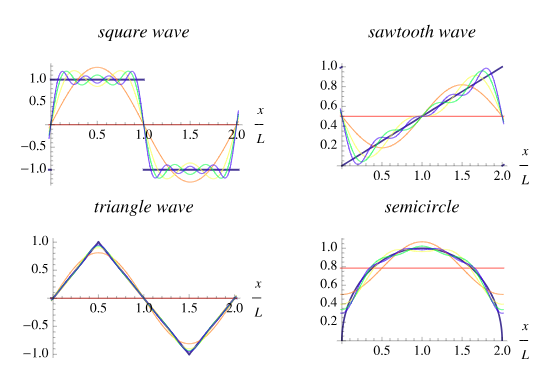
Fourier Principle: Any complex signal can be decomposed into and reconstructed by combining a sum of sinusoidal waves with different amplitudes, frequencies, and phase shifts. This is computed using the Fourier Transform.
Physical/Spatial Meaning of Nyquist: In digital image processing, a spatial frequency pattern with a period (wavelength) of $T$ pixels (e.g., repeating black and white stripes every $T$ pixels) requires at least 2 pixels per period (i.e. sample spacing $\le T/2$) to be faithfully captured without aliasing.
Frequency interpretation in images
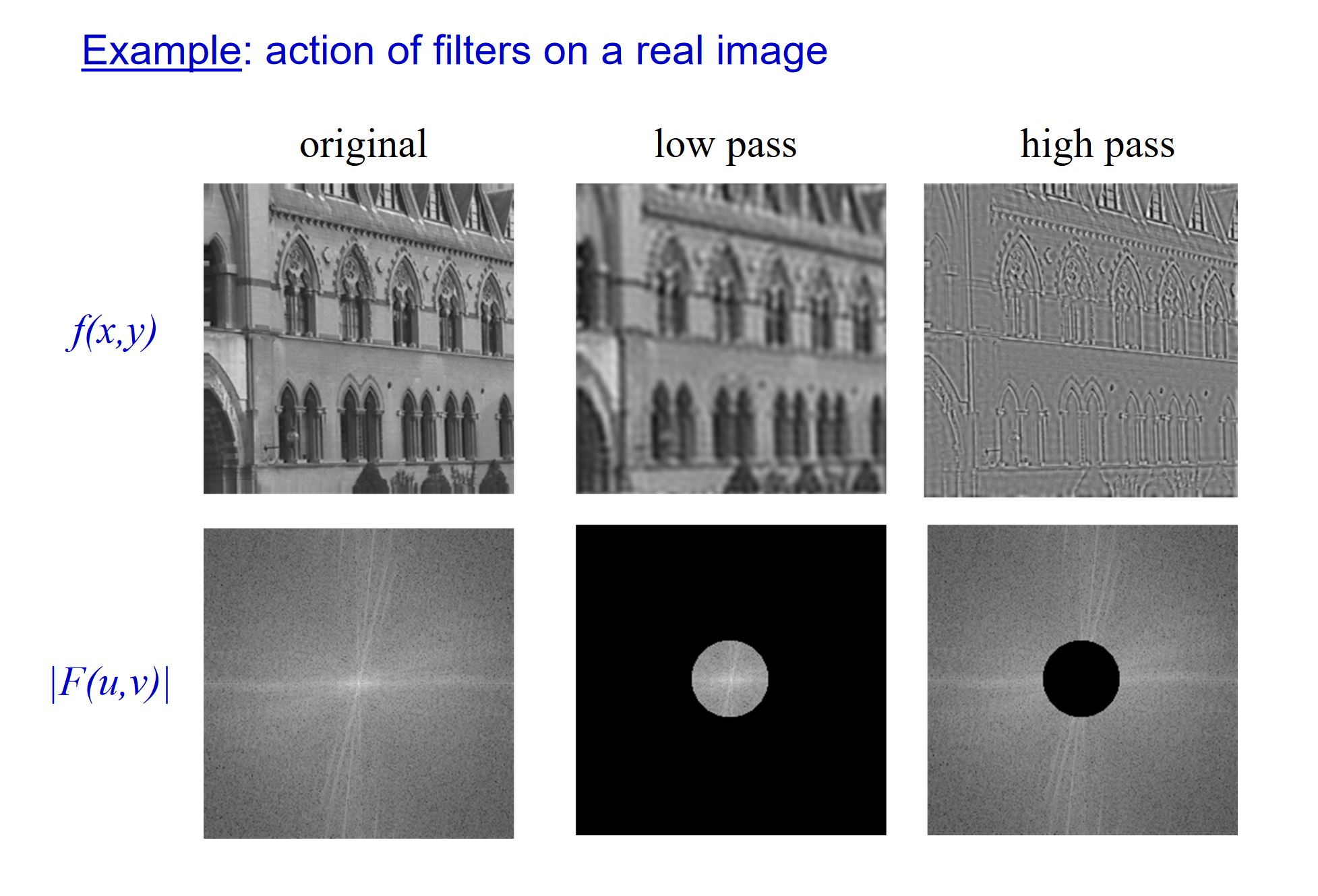
Low frequencies
Slow, gradual intensity changes
Smooth regions, background
Overall shape and illumination
Center of Fourier spectrum
High frequencies
Rapid intensity changes
Edges, textures, fine detail
Noise often lives here
Periphery of Fourier spectrum
DFT and FFT
Discrete Fourier Transform (DFT)
Decomposes a discrete (pixel) image into frequency components. Each output F(u,v) tells us the amplitude and phase of a particular 2D sinusoidal pattern in the image. The FFT (Fast Fourier Transform) computes the DFT efficiently — O(N log N) instead of O(N²).
Fourier Spectrum Characteristics & Effects
Fourier Spectrum Edge Effects
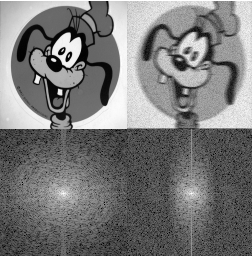
The Phenomenon: A prominent vertical line frequently appears in the Fourier spectrum of real images.
The Cause: Caused by edge effects (artifacts resulting from boundary discontinuities between the opposite edges of the image when treated as periodic).
Horizontal Smoothing Effect
The Phenomenon: Horizontal smoothing reduces high-frequency components in the horizontal direction.
The Cause: Smoothing removes rapid intensity changes, effectively cutting off high spatial frequencies in the direction of the blur.
Frequency domain filters — full comparison
Low-pass filter
Keeps: Low frequencies (center)
Removes: High frequencies (edges)
Effect: Blurring / smoothing
Example: Gaussian filter
High-pass filter
Keeps: High frequencies (edges)
Removes: Low frequencies (center)
Effect: Edge / detail enhancement
Example: Sobel, Laplacian
Band-pass filter
Keeps: A range of frequencies
Removes: Very low and very high
Effect: Texture detection at scale
Example: DoG
Convolution theorem — the key link
Convolution theorem:
Spatial convolution ↔ Frequency multiplication
f ⋆ g ←→ F(u,v) · G(u,v)
Steps for frequency-domain filtering:
1. Compute FFT of image: F = FFT(image)
2. Compute FFT of kernel: H = FFT(kernel)
3. Multiply: Result = F · H (element-wise)
4. Compute inverse FFT: filtered_image = IFFT(Result)
Practical advantage: for LARGE kernels, frequency-domain
multiplication is FASTER than spatial convolution.
Why this matters: The convolution theorem tells us that spatial filtering (sliding kernel) and frequency filtering (multiplying spectra) are equivalent. A Gaussian low-pass filter in spatial domain = circle mask in frequency domain zeroing high-frequency components.
Spatial ↔ frequency filter equivalences
Spatial domain filter
Frequency domain equivalent
Effect
Gaussian blur
Low-pass (smooth circle in center)
Smoothing
Sobel / Laplacian
High-pass (ring at periphery)
Edge enhancement
DoG
Band-pass (annular ring)
Texture / blob detection
Gaussian pyramid size calculator
Image width (px)512
Image height (px)512
Pyramid levels5
Laplacian pyramid reconstruction trace
Enter Gaussian pyramid values (simplified 1D, 3 levels). Computes Laplacian residuals and verifies reconstruction.
G₀ (fine)
G₁ (medium)
G₂ (coarse)
Sinusoidal frequency visualizer
Frequency ω3
Amplitude A60
Phase φ (°)0°
Nyquist calculator
Signal frequency (Hz)10 Hz
Visual Cheat Sheet Summary
50-Question Practice Quiz
This comprehensive practice quiz contains 50 multiple-choice questions loaded directly from the lecture database.
Score: 0 / 0 answered
25-Question True/False Practice
Answer each statement, reveal optional hints, and review the explanation after submitting.
Figures Extracted from the Original Lecture Document
These figures are preserved in their original document order as a complete visual reference. Captions identify the source part and figure number; explanatory text remains in the study-guide sections.
Lecture 6 — original figure 1Lecture 6 — original figure 2Lecture 6 — original figure 3Lecture 6 — original figure 4Lecture 6 — original figure 5Lecture 6 — original figure 6Lecture 6 — original figure 7Lecture 6 — original figure 8Lecture 6 — original figure 9Lecture 6 — original figure 10Lecture 6 — original figure 11Lecture 6 — original figure 12Lecture 6 — original figure 13Lecture 6 — original figure 14Lecture 6 — original figure 15Lecture 6 — original figure 16