Measured intensity — what the camera actually records
R(x,y) — Reflectance
Intrinsic surface property. Ideally invariant to lighting. Encodes color + material.
L(x,y) — Illumination
How light arrives at the surface. Varies over time & scene.
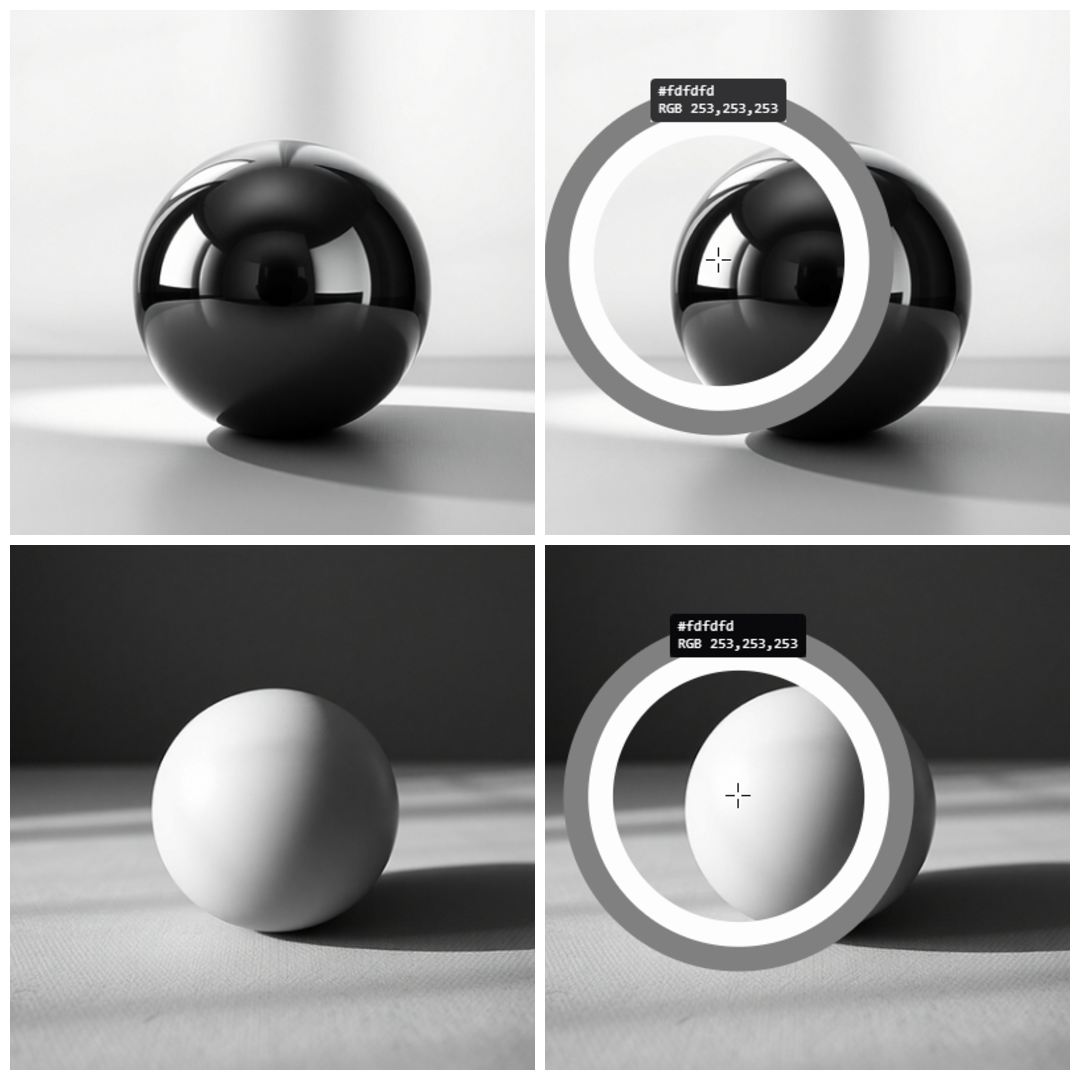
Key ambiguity: The same pixel value can come from a bright surface in shadow OR a dark surface under strong light. A computer can't tell them apart without extra info.
Example: Intrinsic Ambiguity Calculation
Linear Mapping to 8-bit Grayscale
Assume a linear mapping model where:
pixel_value = (I / 1000) · 255, where I = R · L
Let's compare two different scene points that produce the exact same pixel intensity:
Pixel A (Bright surface in shadow): Reflectance RA = 0.80 (80% reflecting), Illumination LA = 250 units.
Intensity: IA = 0.80 · 250 = 200.
Pixel Value = (200 / 1000) · 255 = 51.0
Both Pixel A and Pixel B map to the same digital value (51.0), meaning the camera records them identically, losing the distinct physical attributes of color and lighting.
Two pillars of image formation
Geometry
Controls: Structure & shape
Q: Where does a 3D point land?
Determined by: Camera pose, focal length, FOV, projection model
Capture material/texture/color for reliable recognition, matching, segmentation → reflectance-based features
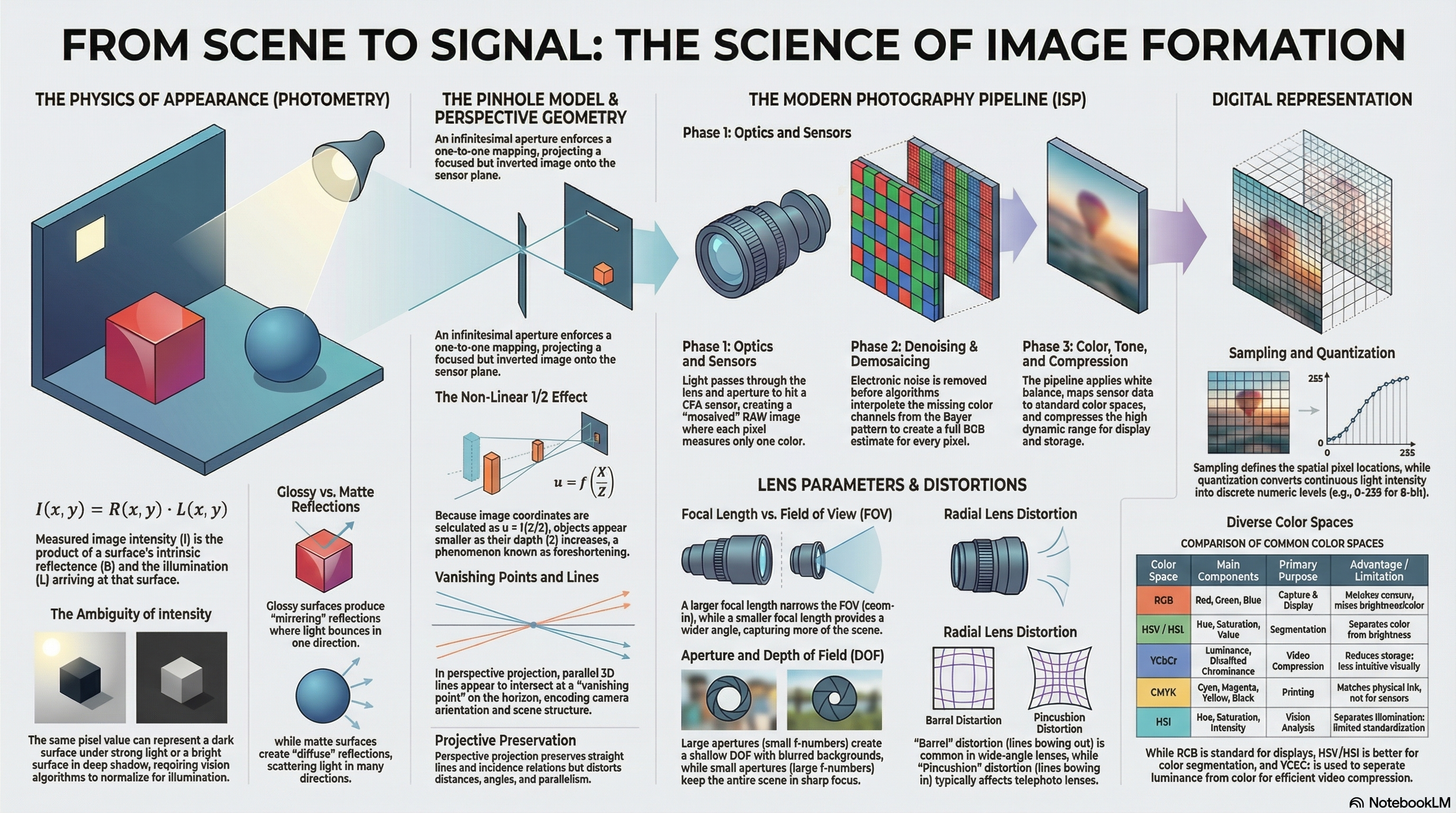
From Scene to Digital Image — Concept Map
1
Scene Interaction & Photometry
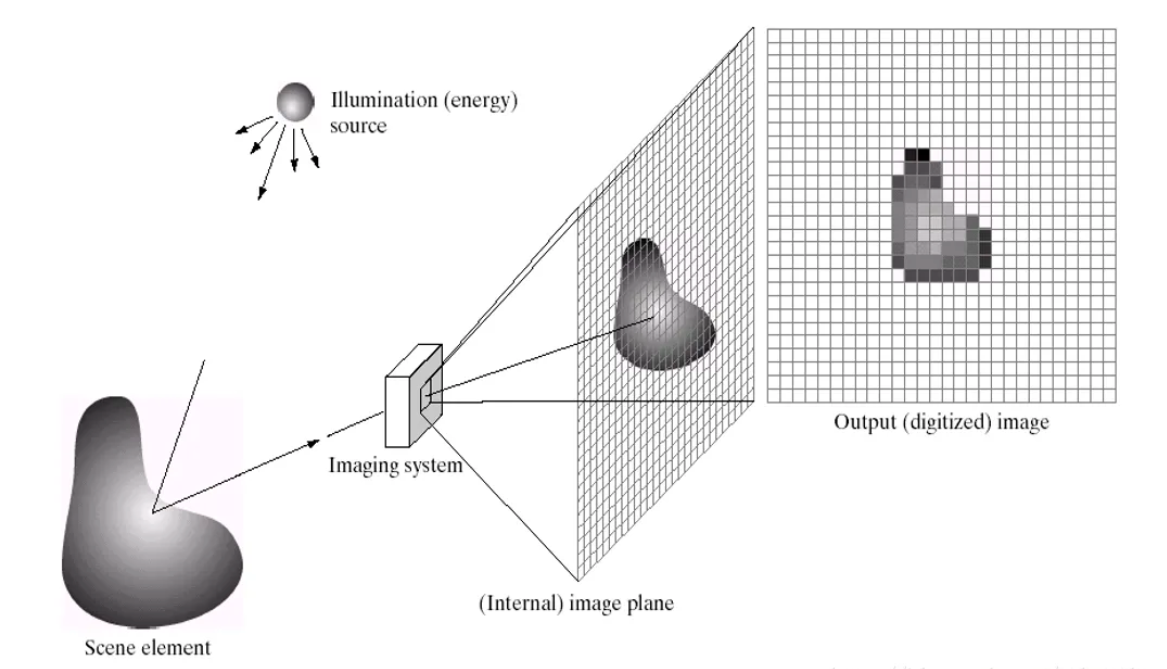
Real World Scene (geometry + materials) → Illumination (light sources, shadows) → Light-Surface Interaction (reflectance/material) → Photometry / Appearance (brightness, color, shading) modeled as I(x,y) = R(x,y) · L(x,y).
2
Imaging Geometry
Real World Scene (geometry + materials) → Imaging Geometry (pinhole, projection, field of view (FOV), depth of field (DOF)). Determines where 3D points project on the 2D plane.
3
Camera System Integration
Imaging Geometry + Photometry / Appearance → Camera System (optics + sensor + ISP). Combines physical projection rays with measured light intensities.
4
Optical & Digital Processing
Camera System → Optical Imperfections (lens distortion) + Digital Representation (sampling, quantization, coordinate grids) + Color Representation (RGB and other color spaces).
✓
Final Output
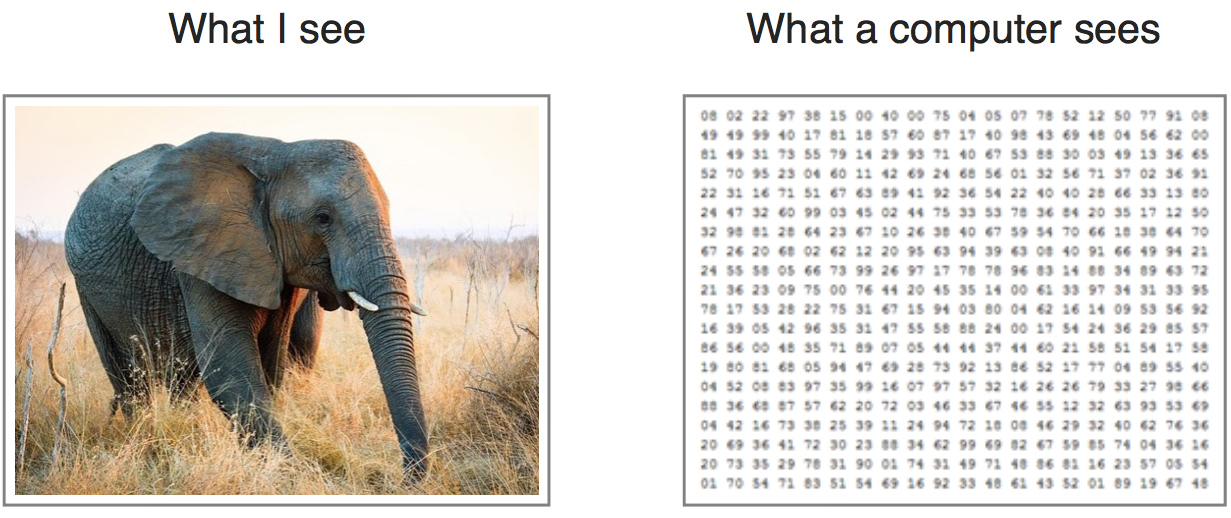
Optical Imperfections + Digital Representation + Color Representation → Final Digital Image (grid of pixels as digital numbers).
Mental model: We do not "see objects" — we measure light.
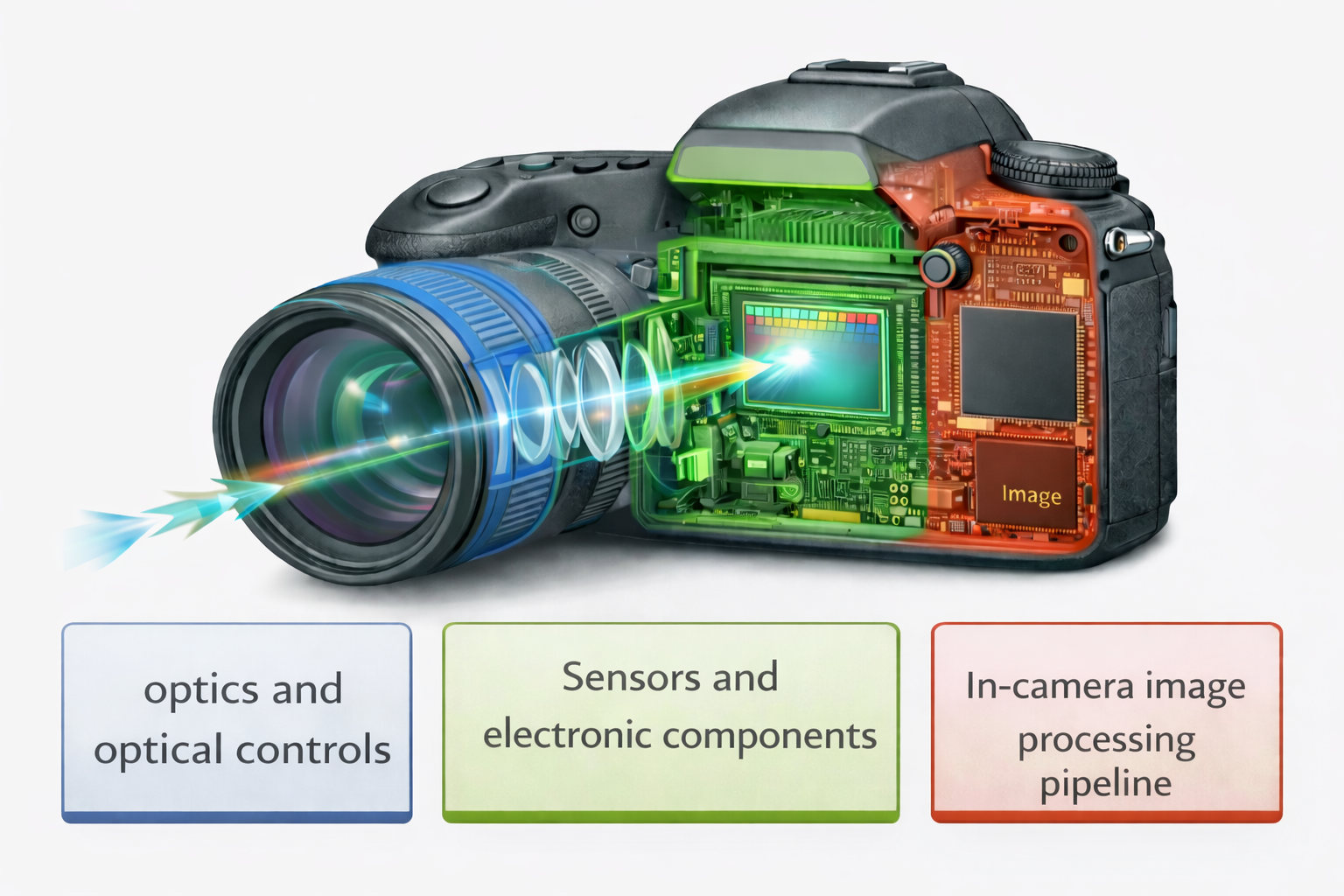
The Photography Pipeline: 3 Distinct Phases
Phase 1: Optics
Optics & Optical Controls
Light enters through the physical camera lens and is restricted by the aperture.
Components: Lens Elements, Aperture, Shutter, Focus Mechanism.
Phase 2: Sensors
Sensors & Electronic Components
Photons strike the Color Filter Array (CFA) sensor and generate analog voltages, which are conditioned by the Analog Front-End and digitized.
Intermediate Output: RAW Image (Mosaiced, Linear, 12-bit).
Phase 3: Digital ISP
In-Camera Image Processing Pipeline
The RAW image goes through digital processing steps:
1. Denoise2. Demosaic3. White Balance4. Color Transform5. Tone Reproduction6. Compression
Final Output: RGB Image (Full Color, Non-linear/Gamma-encoded, 8-bit).
Understanding Sensor Mosaicing & Bayer Pattern
What is a Mosaiced RAW Image?
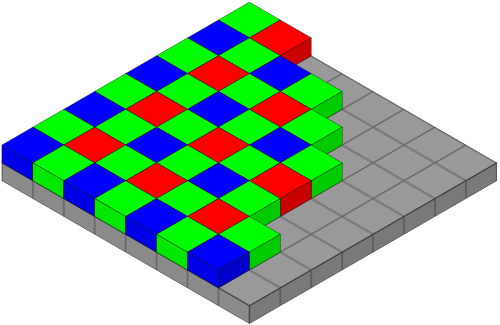
A digital camera sensor does not measure full RGB color at each pixel. Instead, it is covered by a Color Filter Array (CFA). Each individual pixel measures only one color component: Red (R), Green (G), or Blue (B).
The spatial arrangement of these filters forms a mosaic pattern, commonly called the Bayer Pattern (a repeating 2×2 grid containing 2 Green filters, 1 Red filter, and 1 Blue filter per block). More green is used because the human eye is most sensitive to green luminance/detail.
G R B G
Because each pixel contains only a single intensity value, the raw sensor output looks black-and-white. The demosaicing step mathematically interpolates neighboring values to reconstruct the missing color channels and create a full-color RGB image.
RAW vs final RGB — key differences
RAW image (after sensor)
Color: Mosaiced (1 channel/pixel)
Linearity: Linear w.r.t. scene radiance
Bit depth: 12-bit
Viewable? No — requires ISP processing
Final RGB image
Color: Full RGB at every pixel
Linearity: Non-linear (gamma encoded)
Bit depth: 8-bit per channel
Viewable? Yes — standard display format
Each ISP step — what it does & why
1. Denoising
Removes photon noise + electronic noise from RAW. Done FIRST so noise isn't spread into all channels by demosaicing. Over-denoising destroys texture.
2. CFA Demosaicing
Each pixel only has R, G, or B (Bayer pattern: RGGB — 2 green, 1 red, 1 blue per 2×2 block). Demosaicing estimates the 2 missing channels per pixel from neighbors → full RGB.
3. White Balance
Different light sources (sun, incandescent, fluorescent) cast different color temperatures → color cast. WB adjusts per-channel gains so neutral objects appear neutral.
4. Color Transform
Sensor RGB ≠ display RGB. Mathematical matrix maps from sensor color space to a standard display color space for consistency across devices.
5. Tone Reproduction
Real scenes have much wider dynamic range than displays. Tone mapping compresses range while preserving contrast. Defines the image's "look".
6. Compression
Encodes final image (JPEG/PNG) for storage. Trades file size vs visual quality. Lossy compression introduces artifacts.
Critical exam point: Many CV failures originate in early ISP stages (noise, white balance, demosaicing) — NOT in the vision algorithm itself.
Why can't we just view RAW directly?
Only 1 color/pixel (CFA)Linear — looks washed out12-bit — displays are 8-bit
Sensors & Optical Constraints
Sensors: What They Measure
An image sensor does not measure an ideal mathematical point in the scene. Each pixel records the integrated light energy arriving at that pixel.
Integration occurs over:
• Spatial area: The pixel footprint on the image plane.
• Time interval: Exposure time (can cause motion blur).
• Spectral range: Defined by the color filter placed above the pixel.
Thus, a pixel represents an average measurement, not an exact sample.
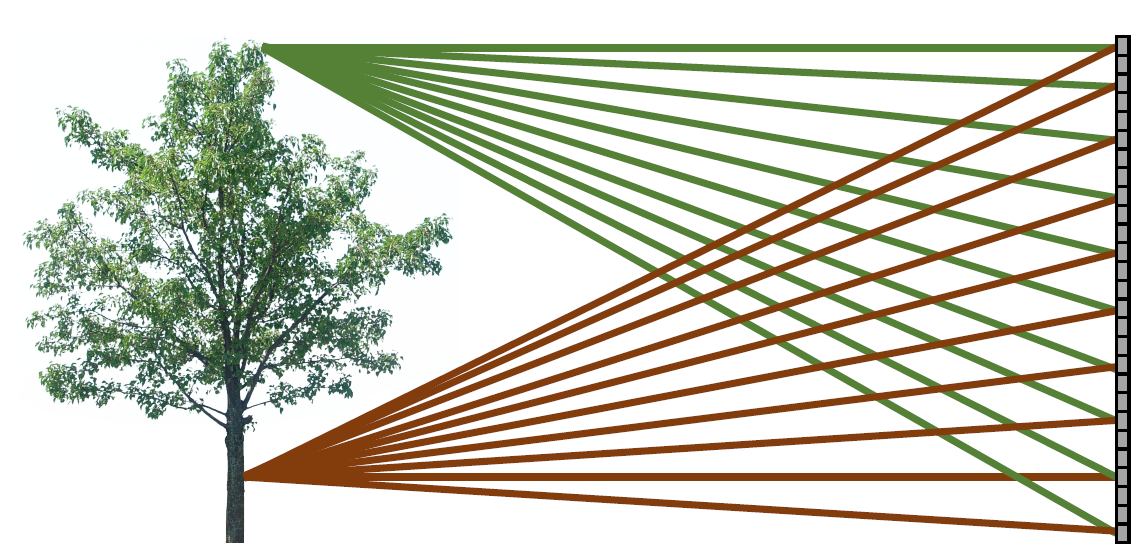
"All Points Contribute" Problem
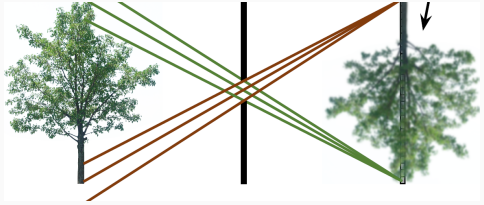
In the absence of optical constraints (no lens or pinhole), light rays from every scene point scatter and reach every sensor pixel.
Consequences of spatial mixing:
• Each pixel contains information from multiple scene locations.
• Fine spatial details become completely indistinguishable.
• The resulting output is a completely blurred, featureless gradient.
The role of optics (lenses/pinholes) is to enforce a one-to-one mapping.
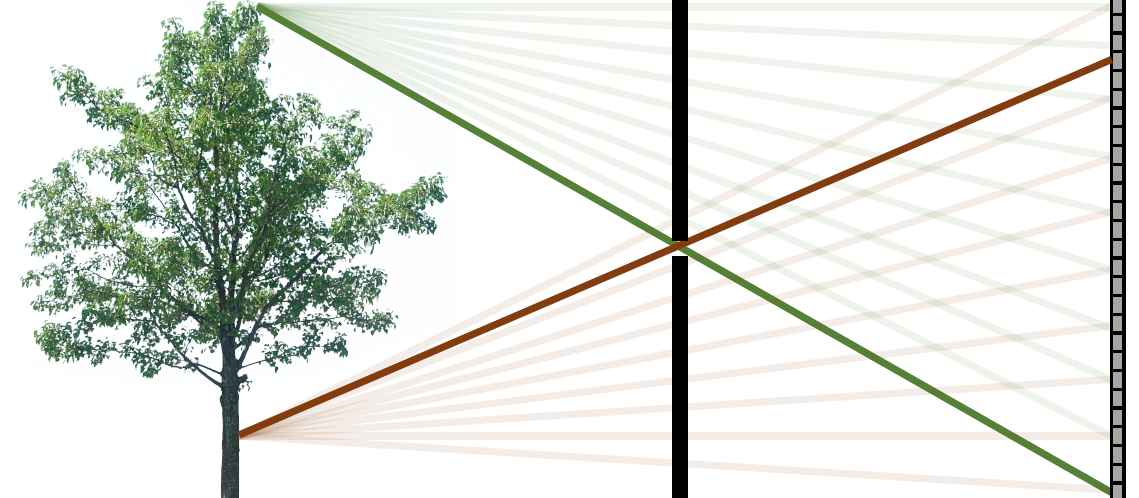
Pinhole camera model
Core principle
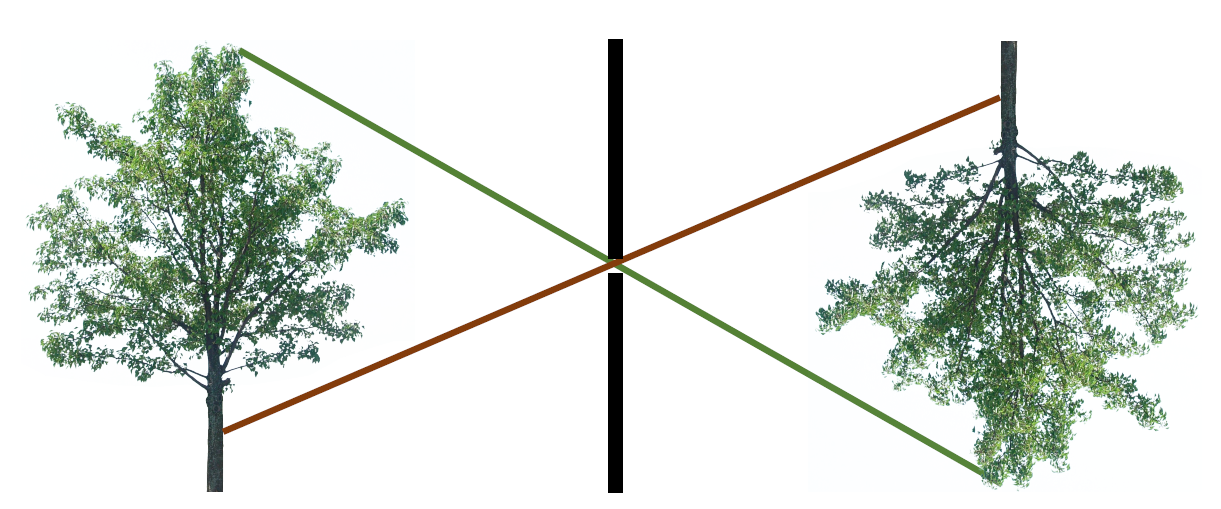
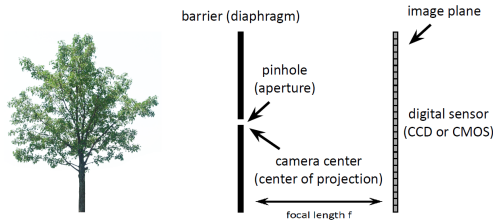
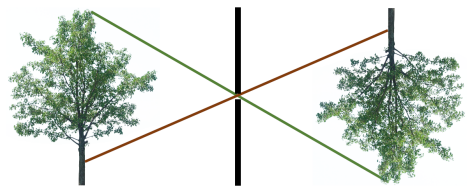
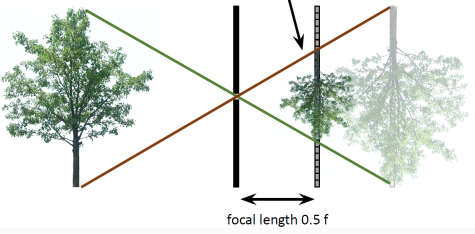
An infinitesimal aperture enforces a single ray path per scene point → one-to-one mapping from 3D scene to 2D image. Result: inverted image.
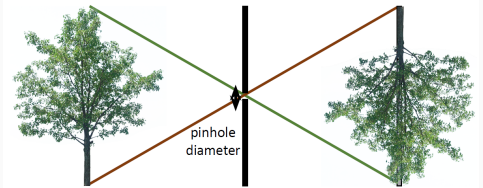
Larger pinhole
More light → brighter image
Multiple rays per point → blur
Smaller pinhole
Less light → dimmer image
Sharper until diffraction dominates
Optimal size exists — there's a sweet spot before diffraction takes over.
Perspective projection equations
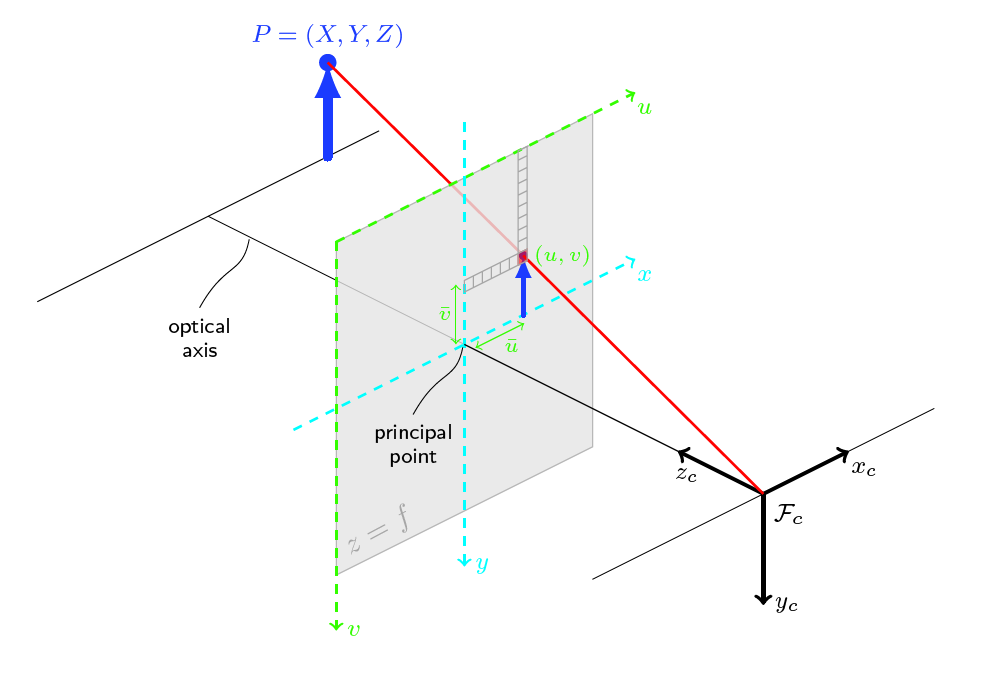
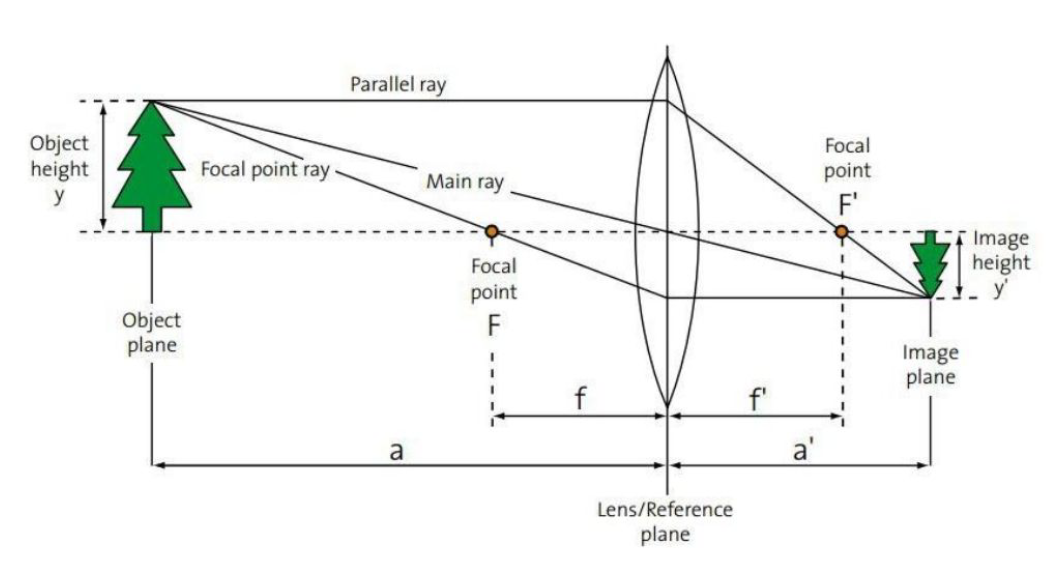
u = f · (X / Z)
v = f · (Y / Z)
(u, v)
Image point on the 2D plane
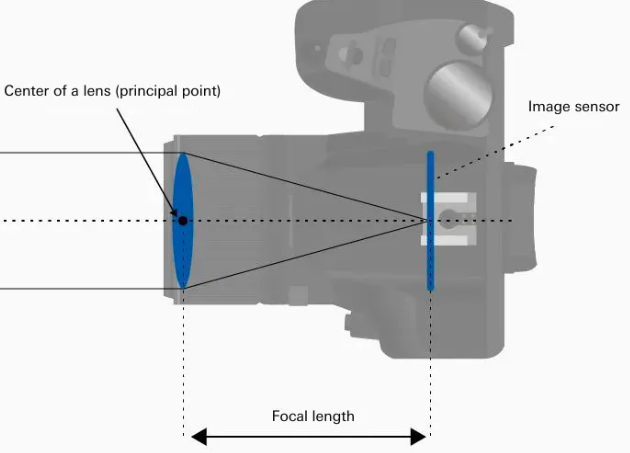
f
Focal length — distance from center to image plane
(X, Y, Z)
3D scene point in camera coords. Z = depth.
Consequences of the 1/Z Term
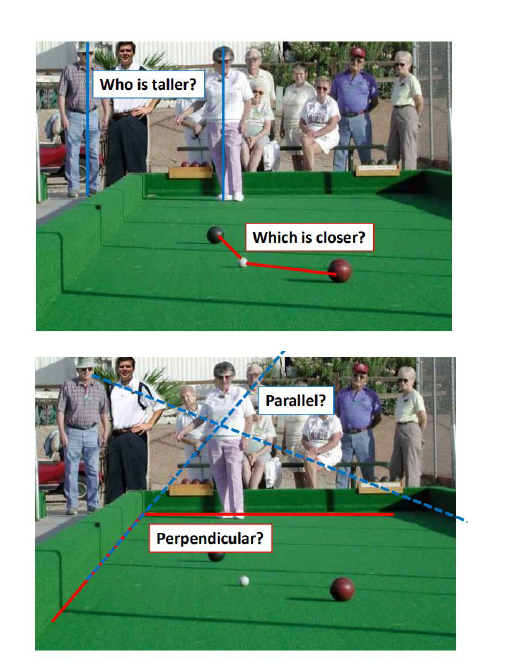
The perspective projection is non-linear due to the division by depth Z. Any two points on the same projection ray (X, Y, Z) and (λX, λY, λZ) project to the same image location (u, v), meaning depth information is lost.
Foreshortening: Objects appear smaller as depth Z increases (larger Z moves coordinates closer to the principal point).
View-dependent appearance: The same object projects to different shapes depending on camera viewpoint.
"Visual Illusions": Many visual illusions are natural geometric consequences of perspective projection rather than errors in human perception.
Magnification
m = y' / y = f / Z
Magnification decreases as depth Z increases. Derived from similar triangles. Larger f → more magnification at same distance.
What projection PRESERVES vs LOSES
Preserved
Straight lines → still straight
Incidence relations (points on lines)
NOT preserved
Distances
Angles
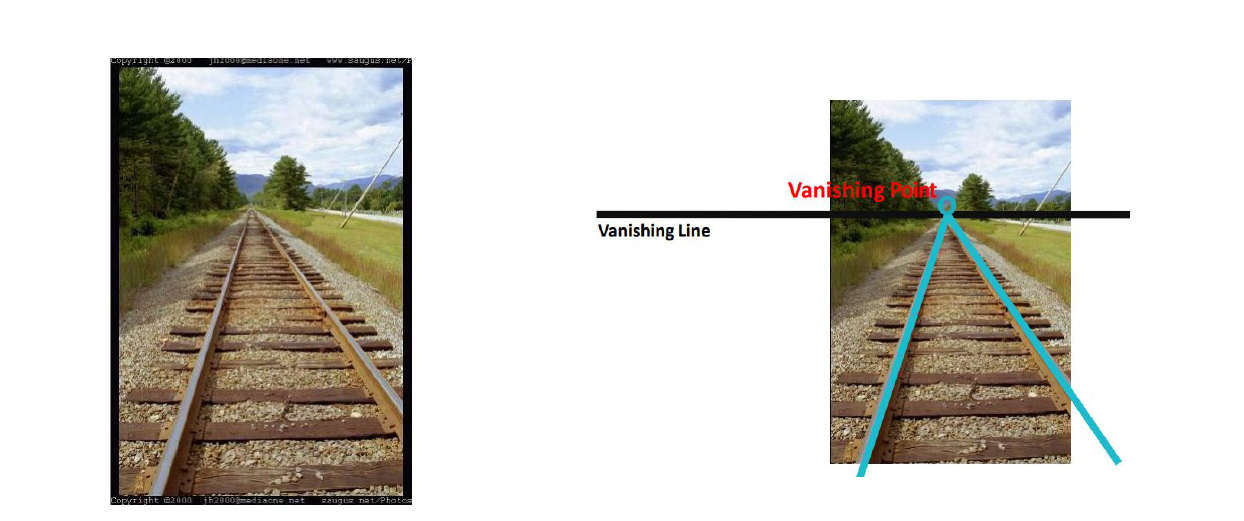
Parallelism (lines can converge)
Implication: Metric measurements (real distances, angles) require camera calibration and explicit geometric modeling.
Vanishing points
Why they exist
3D parallel lines DO NOT intersect in Euclidean space. Under perspective projection they converge to a vanishing point in the image — a point at infinity in projective geometry. Railroad tracks are the classic example.
What they encode
Camera orientation (rotation), dominant scene directions. Used for: camera calibration, horizon estimation, scene understanding (roads, corridors, architecture).
Focal length trade-off
Larger f (telephoto)
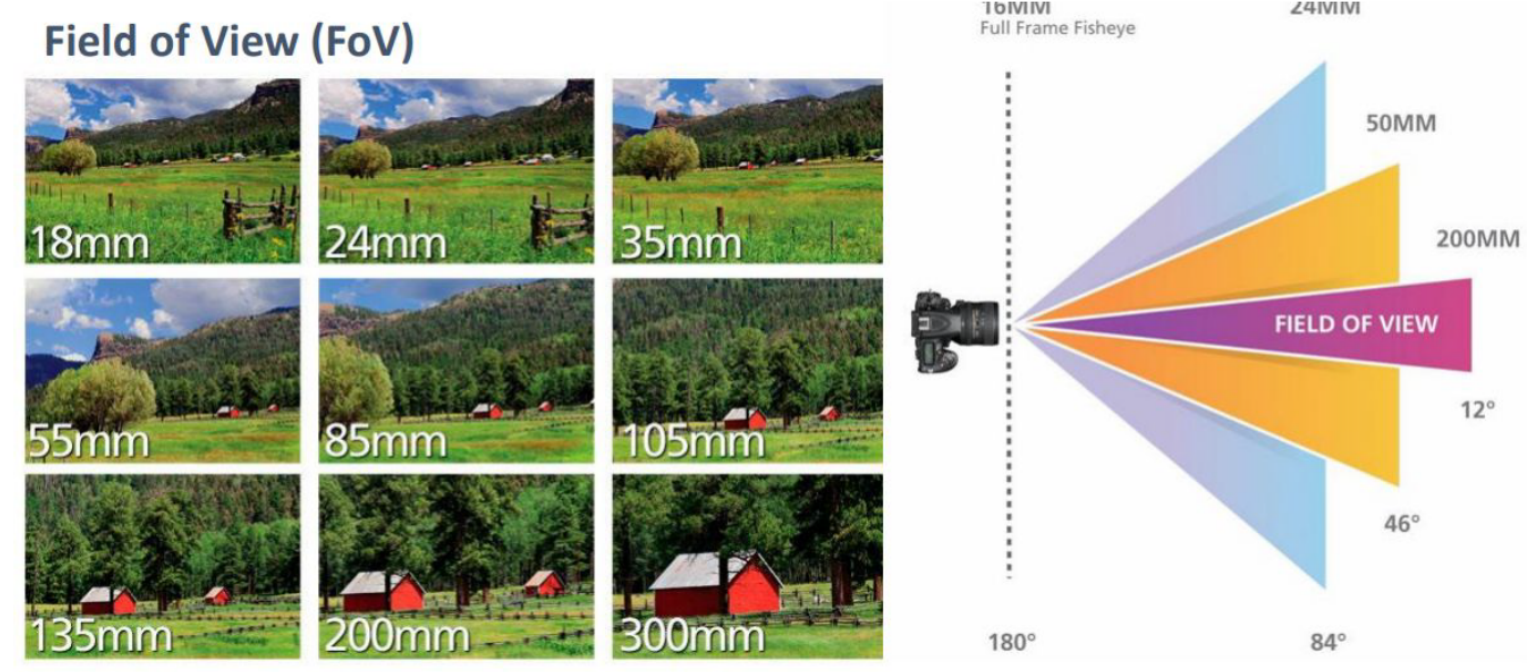
Narrower FOV
More magnification (zoom-in)
Smaller scene portion captured
Smaller f (wide-angle)
Wider FOV
Less magnification
Larger scene portion visible
Important: Changing f affects magnification, NOT scene depth.
Field of View (FOV)
FOV = 2 · tan⁻¹(w / (2f))
w = sensor dimension, f = focal length. FOV depends on BOTH sensor size and focal length.
Focal Length: Increasing focal length f reduces FOV and produces a zoomed-in view.
Sensor Size: Increasing sensor size w (with fixed f) increases FOV and captures a larger portion of the scene.
Measurement: Defined in the camera coordinate system and measured with respect to the optical axis. It can be horizontal, vertical, or diagonal.
Conceptual Note: FOV describes how much of the world is visible, not how large objects appear. Object size in the image depends on both focal length and distance. It does not depend on scene depth.
Depth of Field (DOF)
Definition
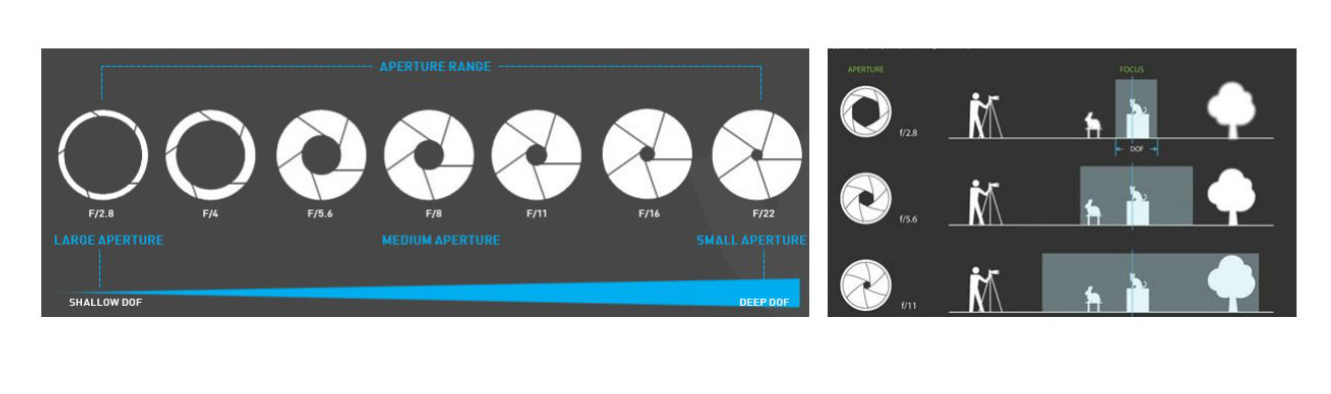
Range of scene distances that appear acceptably sharp. A consequence of finite aperture size. Points OUTSIDE DOF project to blurred circles (circle of confusion), not single points.
Large aperture (small f-number, e.g. f/2.8)
More light → brighter
Shallow DOF → strong background blur (bokeh)
Portrait / subject isolation
Small aperture (large f-number, e.g. f/16)
Less light → darker
Deep DOF → everything sharp
Landscape / architecture
DOF is optical, not projection geometry. It's about blur from aperture, not about where things project.
Why use lenses instead of pinholes?
More light collectionFocus controlControllable FOV and magnification
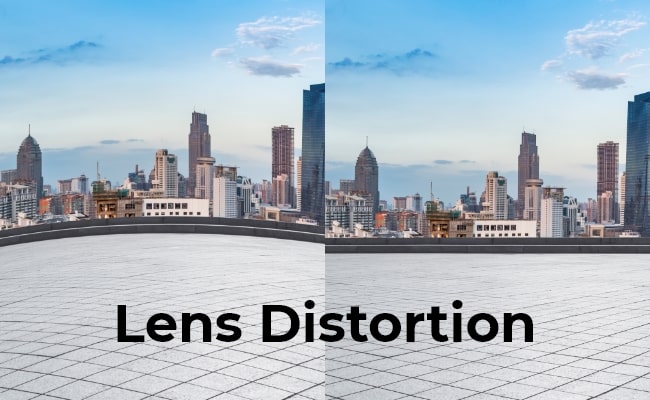
A lens approximates pinhole projection with much better light efficiency. But lenses introduce distortion.
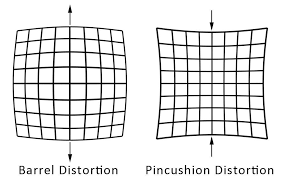
Lens distortion types
Barrel distortion
Magnification decreases from center
Straight lines bow OUTWARD
Wide-angle / action cameras
Pincushion distortion
Magnification increases from center
Straight lines bow INWARD
Telephoto / zoom lenses
r_d = r · (1 + k₁·r² + k₂·r⁴ + k₃·r⁶ + ...)
r = distance from image center. k₁, k₂, k₃ = radial distortion coefficients. Distortion is systematic → correctable through calibration. Points farther from center → larger displacement.
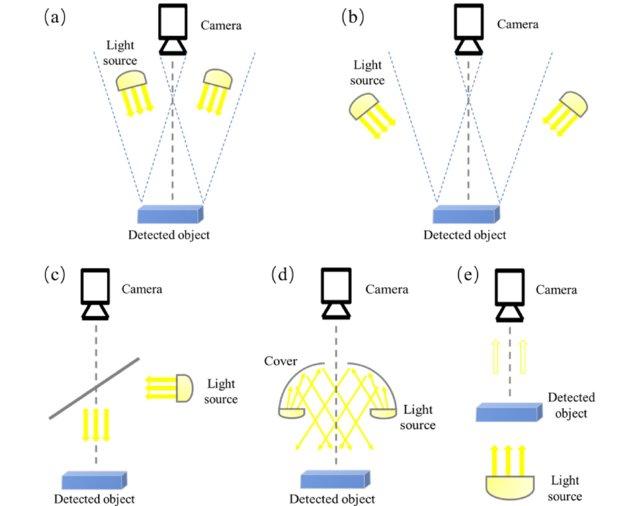
Illumination types and effects
Directional
Strong shadows, high contrast. Like direct sunlight.
Coaxial
Light along camera axis → no shadows, uniform. Used for flat reflective surfaces.
Diffuse
Soft transitions, reduced shadows. Like overcast sky or softbox.
Backlighting
Light behind subject → silhouettes, reduced front detail.
Key: Changes in illumination can dominate pixel values even when objects and camera don't move at all.
Surface reflection & material properties
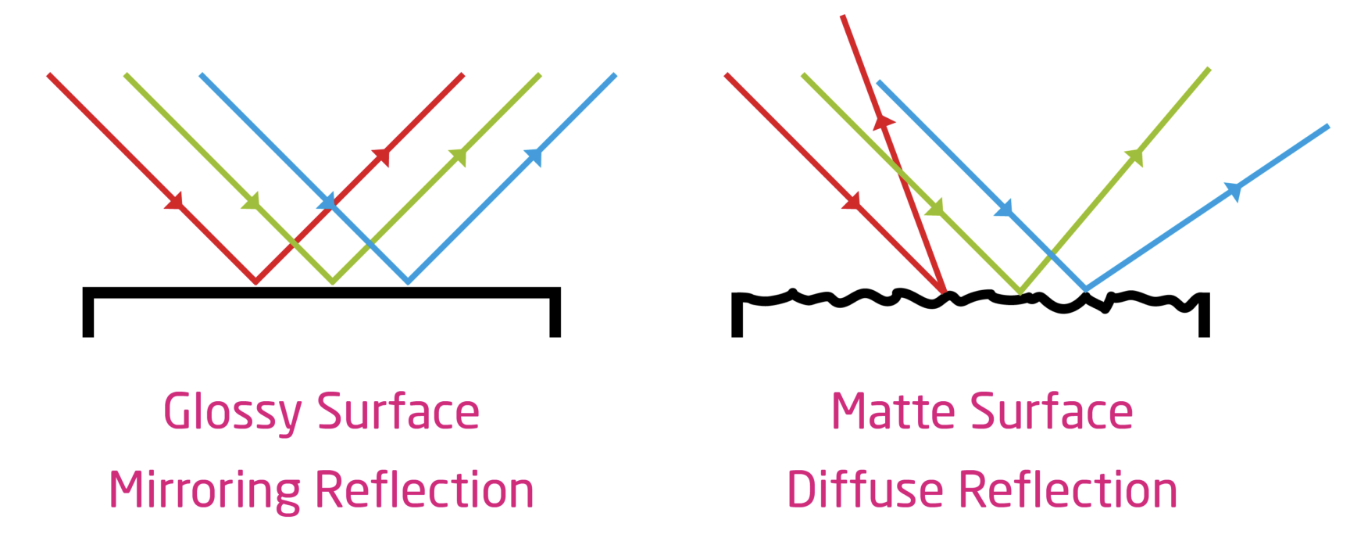
Diffuse (matte)
Light scattered in all directions.
Appearance same from any angle.
Shows texture well.
Specular (glossy)
Light concentrated in highlights.
View-dependent appearance.
Can hide texture, create glare.
Transparency & Reflections: Transparent and highly reflective materials mix background colors with reflections, making their appearance depend strongly on the environment.
Color & Spectral Reflectance: Surface color depends on spectral reflectance, which determines which specific wavelengths of light are absorbed versus reflected.
Texture & Micro-geometry: Physical texture is determined by micro-geometry, which creates fine-scale shading and microscopic specular highlights.
Image as a mathematical function
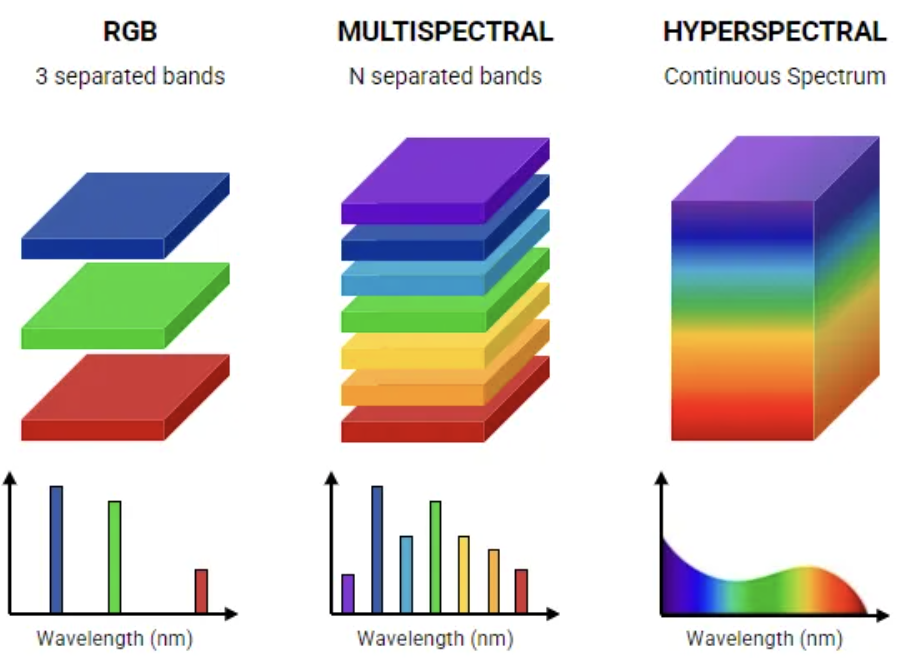
Continuous: I : Ω ⊂ ℝ² → ℝᵏ
Digital: I : ℤ² → ℝᵏ
k = 1
Grayscale image (single intensity value per pixel)
k = 3
Color image (RGB channels)
k = N
Multispectral / hyperspectral (multiple bands)
Types of Spectral Images
RGB Images
Number of Bands: k = 3
Spectrum: Three discrete channels (Red, Green, Blue).
Usage: Acquisition and display systems matching human sight.
Multispectral Images
Number of Bands: k = N (typically 3 to 10)
Spectrum: Multiple separated, discrete bands.
Usage: Standard remote sensing, satellite imaging.
Hyperspectral Images
Number of Bands: k = hundreds of narrow bands.
Spectrum: A continuous, contiguous spectral range across electromagnetic wavelengths.
Usage: Chemical analysis, precise agricultural monitoring, mineral mapping.
Sampling & quantization
Sampling
Selects discrete spatial locations
Each location = one pixel
More samples = finer spatial detail
Quantization
Converts continuous intensity to discrete levels
8-bit = 256 levels (0–255)
More bits = finer intensity resolution
Coordinate conventions
Image coordinates
Row, column indexing → (y, x)
Origin: top-left corner
Used in pixel access / arrays
Cartesian coordinates
Position as (x, y)
Used in geometric / projection math
Must specify convention to avoid bugs
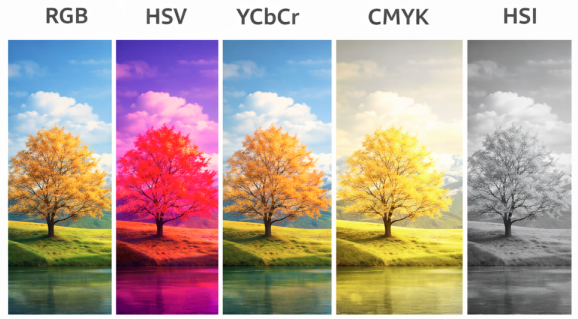
Color spaces — full comparison
RGB (Red, Green, Blue)
Acquisition & Display
Purpose & Design: Directly matches camera sensors and monitor displays. Mixes brightness and color information.
Limitations: Highly sensitive to illumination changes, making pure RGB comparison difficult under shadows or varying brightness.
Applications: Image capture, standard displays, object detection, image classification, face recognition, deep learning pipelines.
HSV / HSL (Hue, Saturation, Value / Lightness)
Segmentation & Tracking
Purpose & Design: Separates color info (Hue) from brightness (Value/Lightness) and purity (Saturation) for intuitive color-based analysis.
Limitations: Not perceptually uniform (a mathematical distance between colors doesn't map to human color perception).
Why switch color spaces? RGB mixes brightness and color together — that makes many tasks harder. Alternative spaces isolate the property you care about → simpler algorithms, better robustness to lighting.
I = R × L pixel simulator
Demonstrates how two completely different surfaces can produce identical pixel values. Adjust R and L for each pixel.
Pixel A
R_A (reflectance)0.80
L_A (illumination)250
Pixel B
R_B (reflectance)0.20
L_B (illumination)1000
Perspective projection calculator
Given a 3D point P=(X,Y,Z) and focal length f, compute image coordinates (u,v).
X100
Y50
Z (depth)500
f100
FOV calculator
Sensor width (px)1000
Focal length f100
Visual Cheat Sheet Summary
50-Question Practice Quiz
This comprehensive practice quiz contains 50 multiple-choice questions loaded directly from the lecture database.
Score: 0 / 0 answered
25-Question True/False Practice
Answer each statement, reveal optional hints, and review the explanation after submitting.
Figures Extracted from the Original Lecture Document
These figures are preserved in their original document order as a complete visual reference. Captions identify the source part and figure number; explanatory text remains in the study-guide sections.
Lecture 2 — original figure 1Lecture 2 — original figure 2Lecture 2 — original figure 3Lecture 2 — original figure 4Lecture 2 — original figure 5Lecture 2 — original figure 6Lecture 2 — original figure 7Lecture 2 — original figure 8Lecture 2 — original figure 9Lecture 2 — original figure 10Lecture 2 — original figure 11Lecture 2 — original figure 12Lecture 2 — original figure 13Lecture 2 — original figure 14Lecture 2 — original figure 15Lecture 2 — original figure 16Lecture 2 — original figure 17Lecture 2 — original figure 18Lecture 2 — original figure 19Lecture 2 — original figure 20Lecture 2 — original figure 21Lecture 2 — original figure 22Lecture 2 — original figure 23Lecture 2 — original figure 24Lecture 2 — original figure 25Lecture 2 — original figure 26Lecture 2 — original figure 27