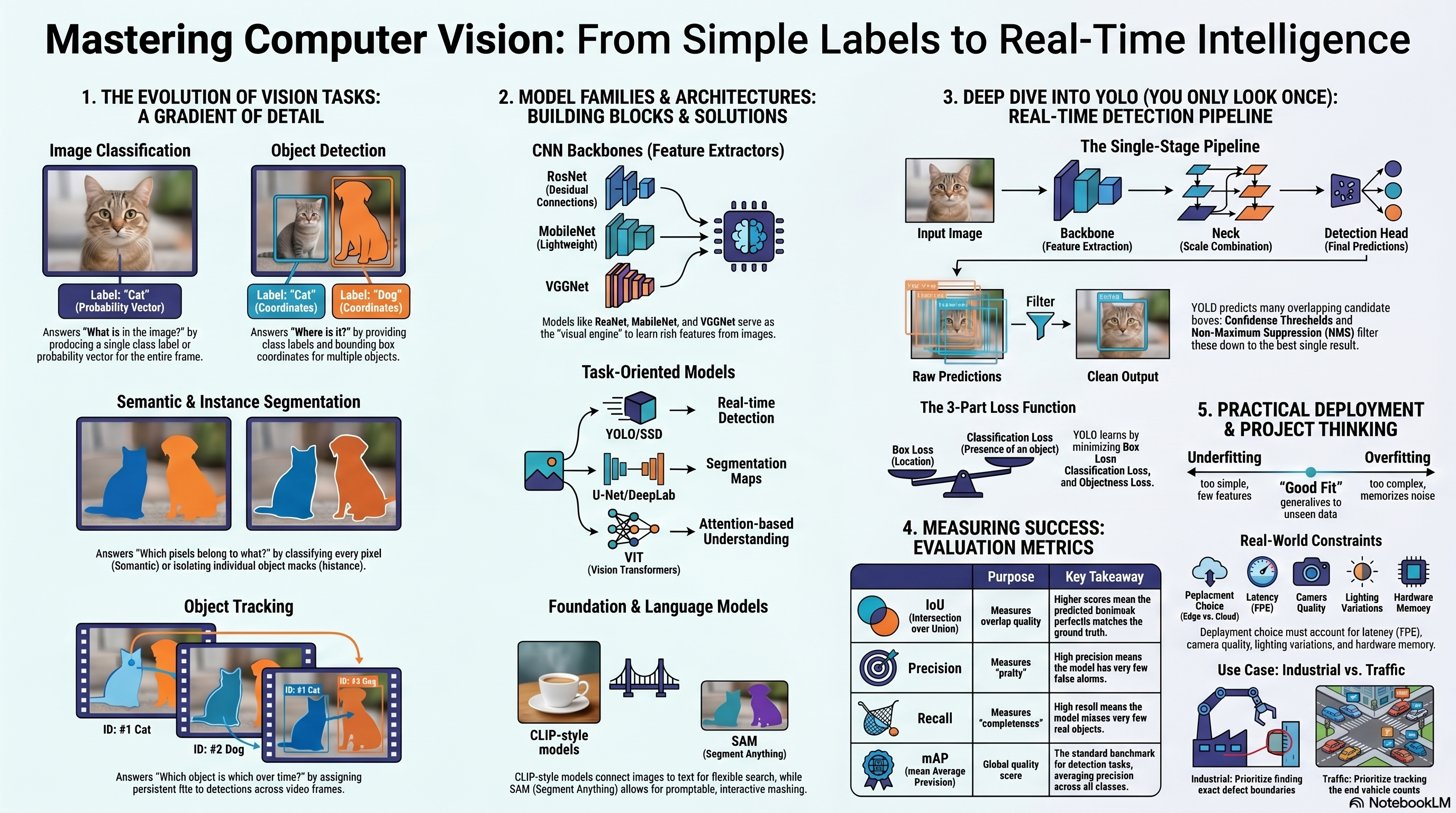
A standard CNN classifier receives an image and produces a prediction about the main class represented. The output is usually a vector of class scores/probabilities, and the class with the highest score is selected as the predicted label. While image classification answers: What is the main content of this image?, it does not tell us where objects are located.
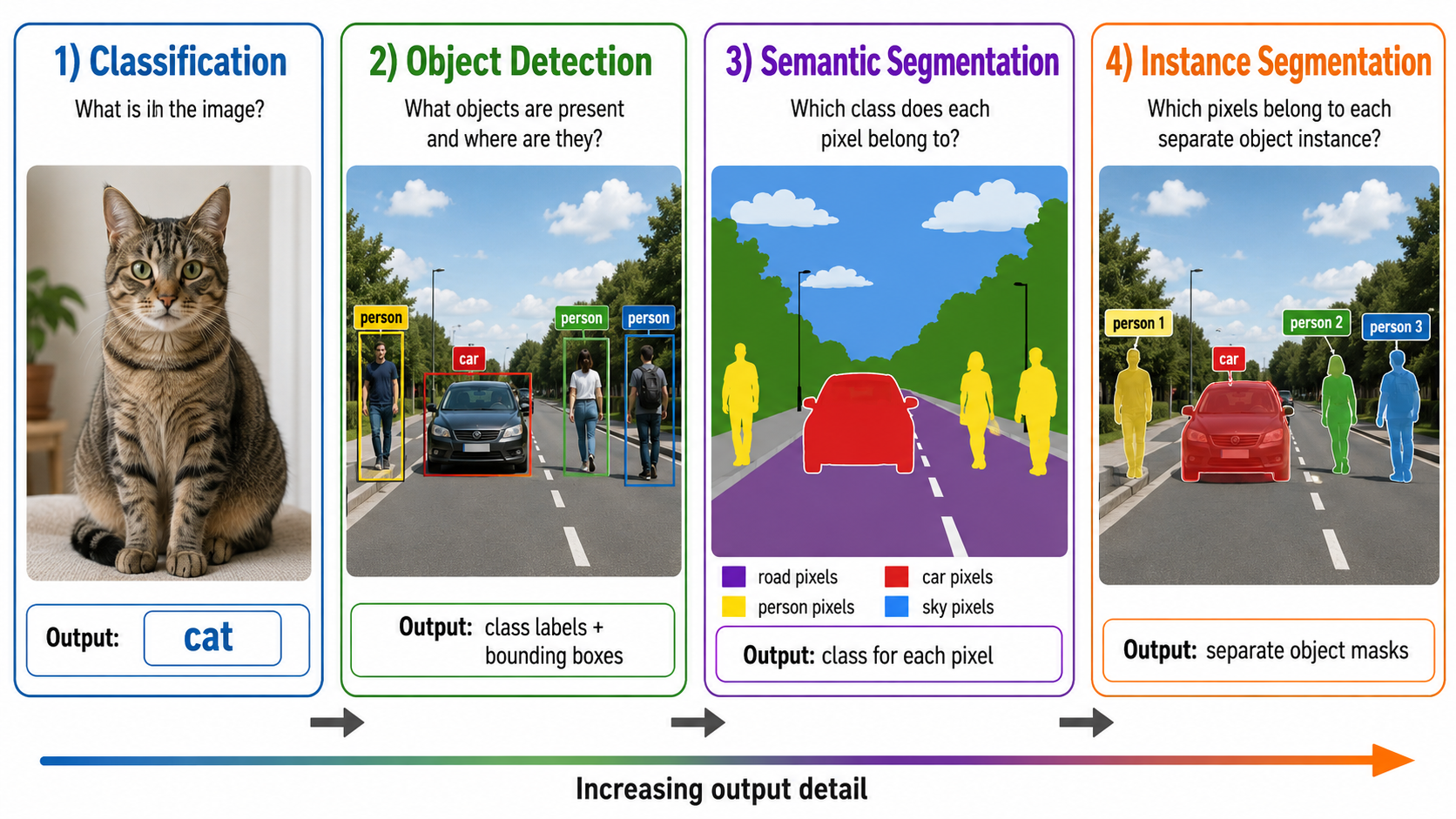
Many real-world vision applications need richer, pixel-specific, or temporal outputs. As we move from classification to tracking, the level of output detail and complexity increases.
Five Core Vision Output Types
1. Classification
What is the main content of the image?
Output: one class distribution or label for the whole image.
Does not localize objects.
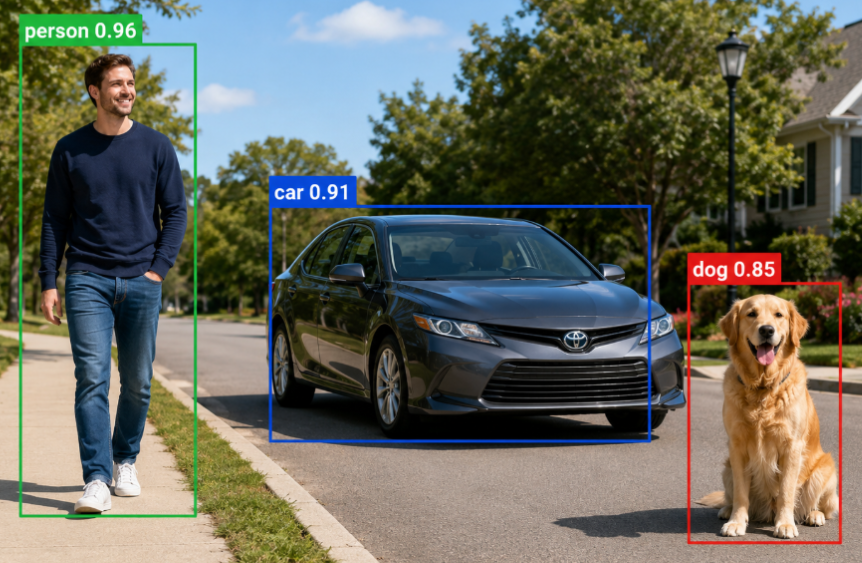
2. Object Detection
What objects exist and where are they?
Outputs: Class labels + Bounding Boxes (coordinates).
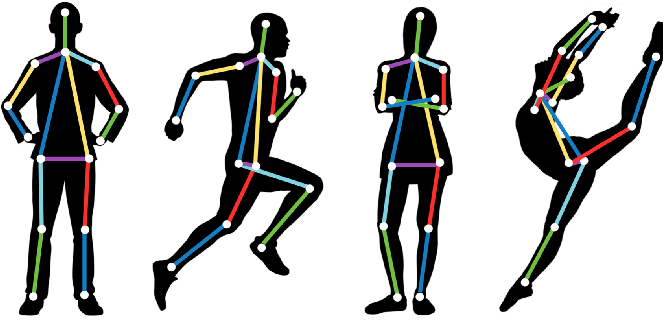
Which object in this frame is the same as from previous frames?
Outputs: Dynamic bounding boxes with persistent Track IDs.
Applications: People counting, security monitoring.
The Complexity Continuum
Moving from left to right increases output detail and complexity:
Classification ➔ Object Detection ➔ Semantic Segmentation ➔ Instance Segmentation ➔ Tracking & Video intelligence
Practical Rule: A richer output requires significantly more annotation effort, more careful metric evaluation, and more complex deployment constraints.
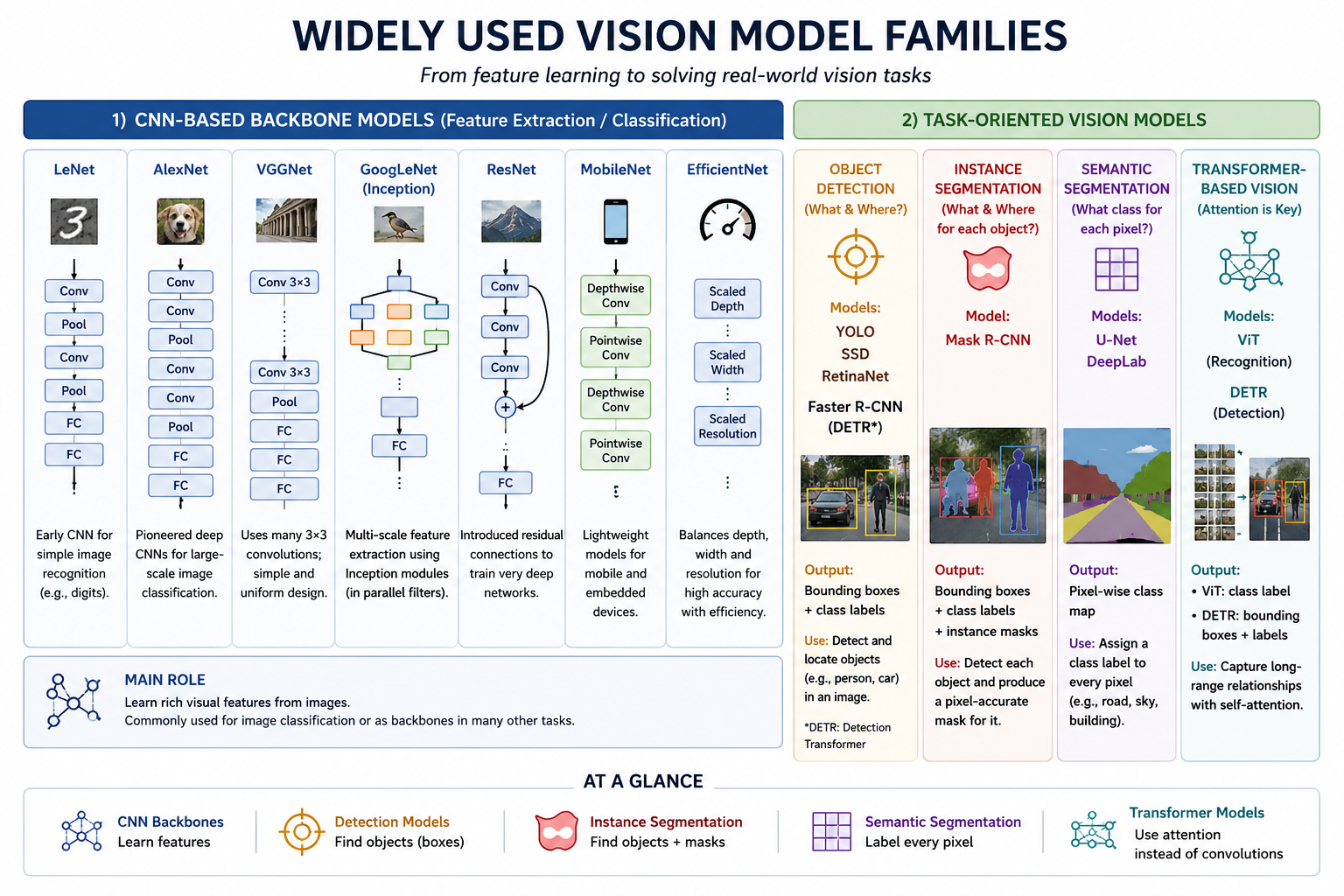
1. CNN Backbone Models (Feature Extraction)
These models are designed to learn rich visual features from images. They are commonly used for standard image classification, or act as the "backbone" inside larger task-oriented vision architectures (like YOLO or Mask R-CNN).
Early & Deep
LeNet: Early CNN for simple digit recognition (MNIST).
AlexNet: Pioneered deep CNNs on ImageNet.
VGGNet: Uniform design with stacks of $3 \times 3$ filters.
Advanced Features
GoogLeNet: Multi-scale feature extraction via Inception modules.
ResNet: Residual skip connections to train ultra-deep networks.
Efficiency Oriented
MobileNet: Lightweight depthwise separable convolutions for edge devices.
EfficientNet: Systematically balances depth, width, and resolution.
2. Task-Oriented Model Families
Model Family
Main Output
Typical Use Case / Characteristics
YOLO, SSD, RetinaNet
Bounding boxes & class labels
Single-stage, real-time object detection in video frames.
Faster R-CNN, Mask R-CNN
Region proposals, boxes, masks
Two-stage, highly accurate detection and instance segmentation.
Step 1: Propose candidate object regions (Region Proposal Network).
Step 2: Classify each proposed region and refine its box boundaries.
• Examples: R-CNN, Fast R-CNN, Faster R-CNN, Mask R-CNN.
• Typical trade-off: Proposal processing usually increases latency, although accuracy depends on the architecture, training, and evaluation setting.
Single-Stage Detectors
Predict object classes and bounding boxes directly in a single forward pass, without a separate proposal step.
• Examples: YOLO, SSD, RetinaNet.
• Typical trade-off: Efficient end-to-end inference suited to real-time systems; small/crowded-object performance depends on feature resolution and model design rather than stage count alone.
YOLO: You Only Look Once
YOLO is a family of single-stage object detection models designed to predict bounding boxes and class-related confidence scores in one forward pass. Early YOLO versions described a fixed grid of cells; modern versions generally predict at many locations over multiple feature-map scales and may use anchor-based or anchor-free heads. Exact output parameterization and post-processing are version-dependent.
Main Architectural Components
1
Backbone: Extracts visual features from the input image. Early layers capture primitive structures (edges, textures); deep layers capture semantic structures (object parts).
2
Neck: Combines features from different scales (resolutions) using feature pyramids. This is critical for detecting both small and large objects.
3
Detection Head: Produces box parameters and class/confidence scores at multiple prediction locations. Some YOLO variants include an explicit objectness branch; others use different confidence formulations.
Bounding-Box Representations
A box can be stored as corners \((x_1,y_1,x_2,y_2)\) or as center and size \((c_x,c_y,w,h)\):
\[
x_1=c_x-\frac{w}{2},\quad y_1=c_y-\frac{h}{2},\quad
x_2=c_x+\frac{w}{2},\quad y_2=c_y+\frac{h}{2}.
\]
Coordinates may be absolute pixels or normalized by image width and height; training and decoding must use the same convention.
Raw Predictions & Filtering
The Need for Post-Processing
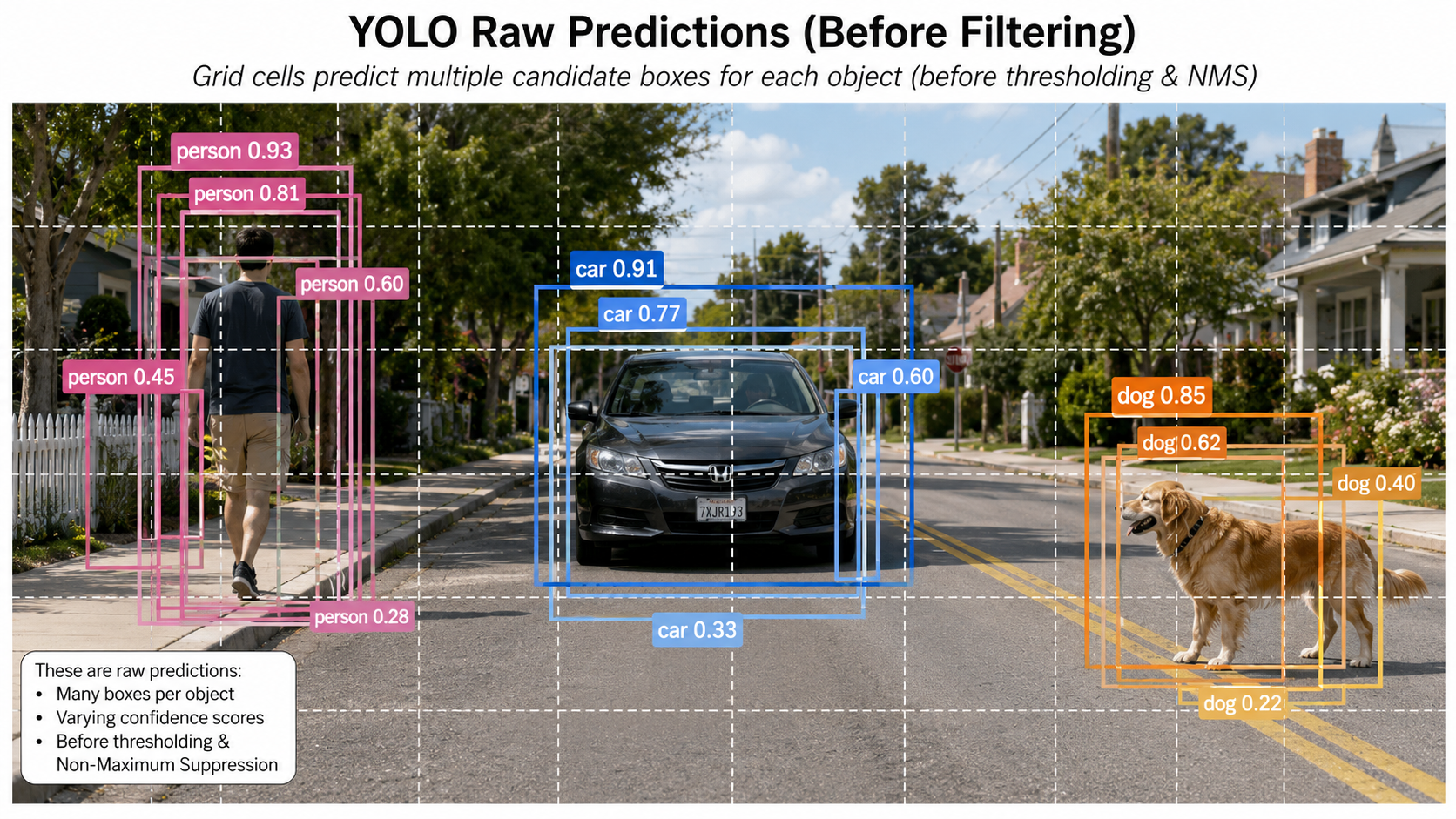
YOLO evaluates multiple locations simultaneously, producing multiple overlapping candidate boxes around the same object, plus many weak background detections. Post-processing filters this raw output:
• Confidence Thresholding: Discards any candidate whose final detection score falls below a selected threshold. How this score combines class confidence and objectness is version-dependent.
• Non-Maximum Suppression (NMS): Groups overlapping boxes belonging to the same class. It keeps the box with the highest confidence and suppresses (discards) other overlapping boxes whose Intersection over Union (IoU) exceeds a set overlap threshold.
Non-Maximum Suppression Algorithm
For boxes \(A\) and \(B\):
\[
\operatorname{IoU}(A,B)=\frac{|A\cap B|}{|A\cup B|}
=\frac{|A\cap B|}{|A|+|B|-|A\cap B|}.
\]
1. Remove boxes below the confidence threshold.
2. For each class (in class-aware NMS), select the highest-scoring remaining box.
3. Keep it and suppress remaining boxes whose IoU with it exceeds tau_NMS.
4. Repeat until no candidates remain.
Lower tau_NMS suppresses more aggressively. NMS is common in YOLO-style pipelines, but
end-to-end set predictors such as original DETR are designed not to require NMS.
Pretraining on the COCO Dataset
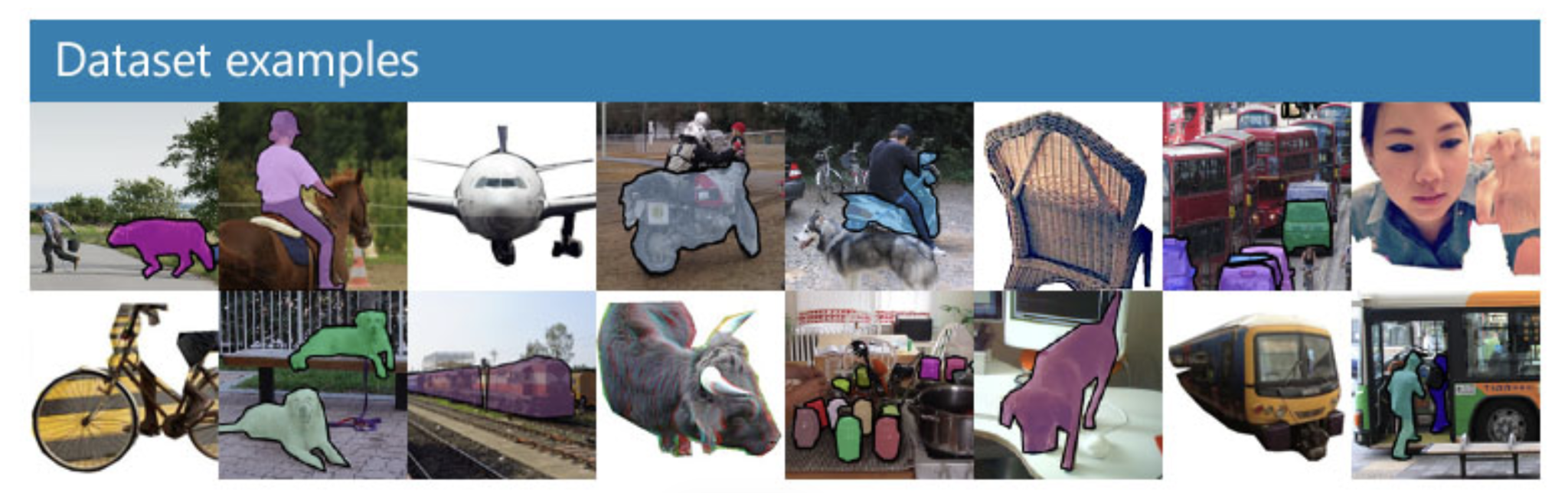
COCO (Common Objects in Context) is a large-scale dataset used for benchmarking vision tasks.
✔ Key stats: 330K images ($>200K$ labeled), 1.5 million object instances, 80 object categories (people, animals, vehicles, household items), 91 stuff categories, and keypoints for 250K people.
Pretraining a YOLO model on COCO teaches it strong general visual representations. For custom applications, engineers typically take a COCO-pretrained model and fine-tune it on their custom labeled dataset.
Object Detection Loss Function
A detector commonly minimizes a weighted multi-task objective. The exact losses and whether a separate objectness term exists depend on the YOLO version:
Box Loss (Localization): Measures how accurately the coordinates and dimensions match the ground-truth box.
Classification Loss: Measures the accuracy of the predicted class probabilities.
Objectness/Confidence Loss: Measures whether the model correctly distinguishes between background cells and cells containing objects.
A generic detector objective is
\[
\mathcal{L}=\lambda_{box}\mathcal{L}_{box}
+\lambda_{cls}\mathcal{L}_{cls}
+\lambda_{obj}\mathcal{L}_{obj}.
\]
\(\mathcal{L}_{box}\) may use IoU-family losses, \(\mathcal{L}_{cls}\) often uses binary/categorical classification loss, and \(\mathcal{L}_{obj}\) is included only for heads with explicit objectness. The \(\lambda\) coefficients balance terms with different scales.
Instance Segmentation with Mask R-CNN
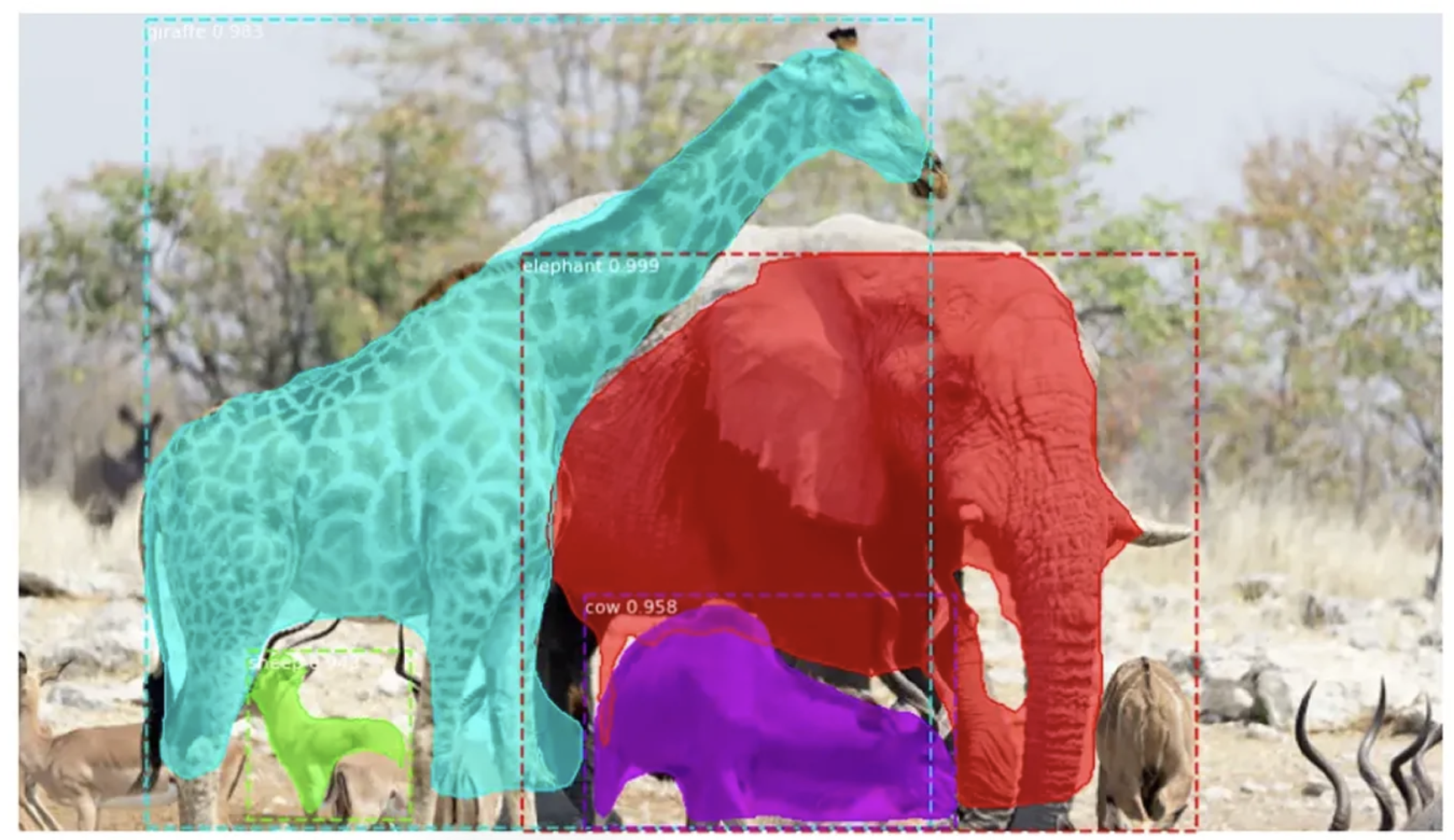
Mask R-CNN extends Faster R-CNN by adding a branch that outputs a pixel-level binary mask for each detected object. It provides exact spatial boundaries rather than simple rectangles. This is crucial for medical imagery, industrial defect segmentation, and scene understanding where object overlap makes bounding boxes ambiguous.
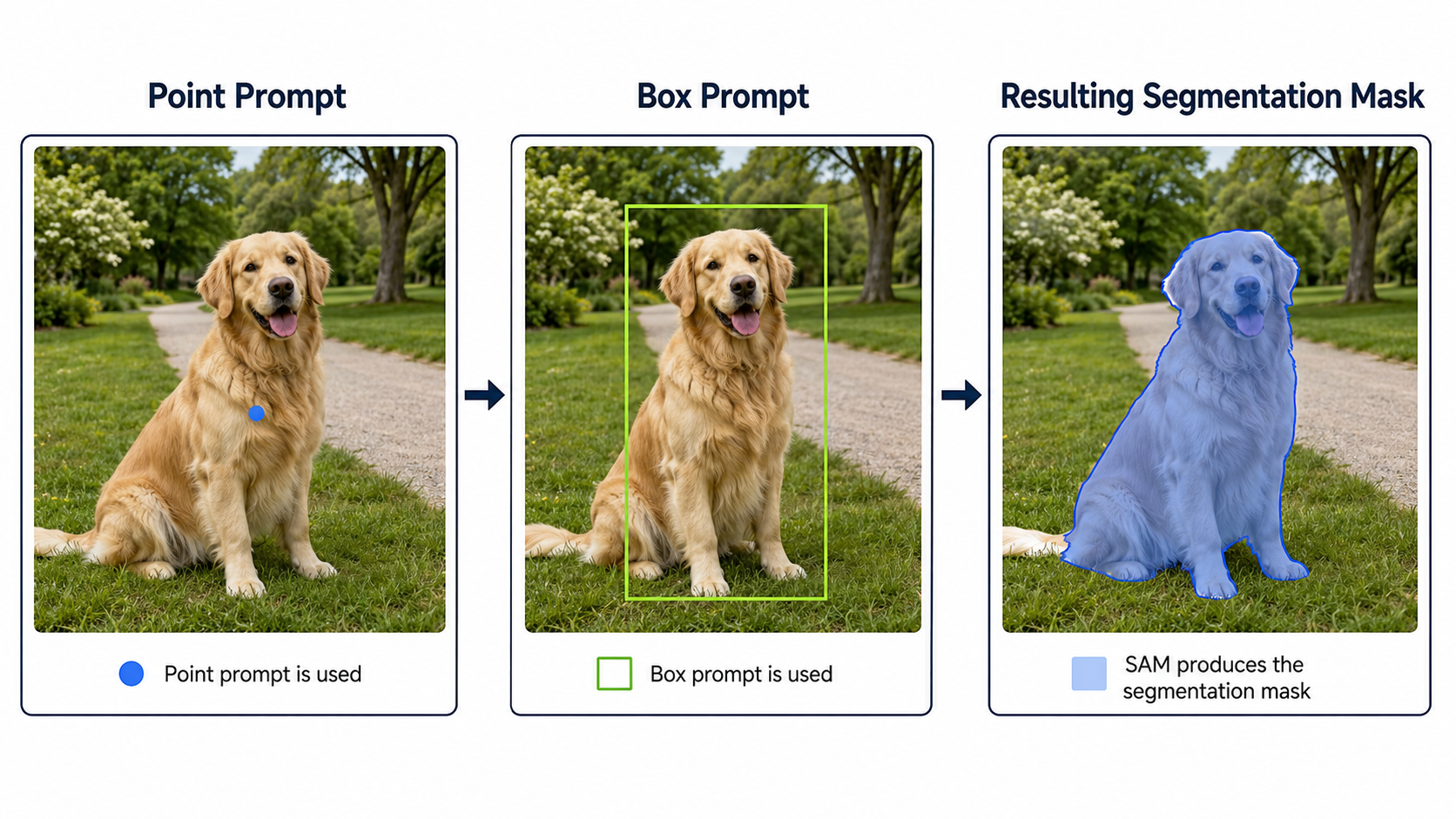
Segment Anything Model (SAM & SAM 2)
SAM is a promptable foundation model for segmentation. It can generate masks in a zero-shot manner based on user prompts:
• Point Prompt: User clicks a single point on an object; SAM generates its mask.
• Box Prompt: User draws a bounding box; SAM segments the object inside.
• Automatic Mask Generation: SAM segments every distinct object in the entire image.
SAM 2 extends this promptable capability to video, maintaining object mask consistency across consecutive frames despite motion and occlusion.
Note: SAM focuses on pixel boundaries but does not assign fixed class labels (e.g. "car") out of the box like standard supervised models.
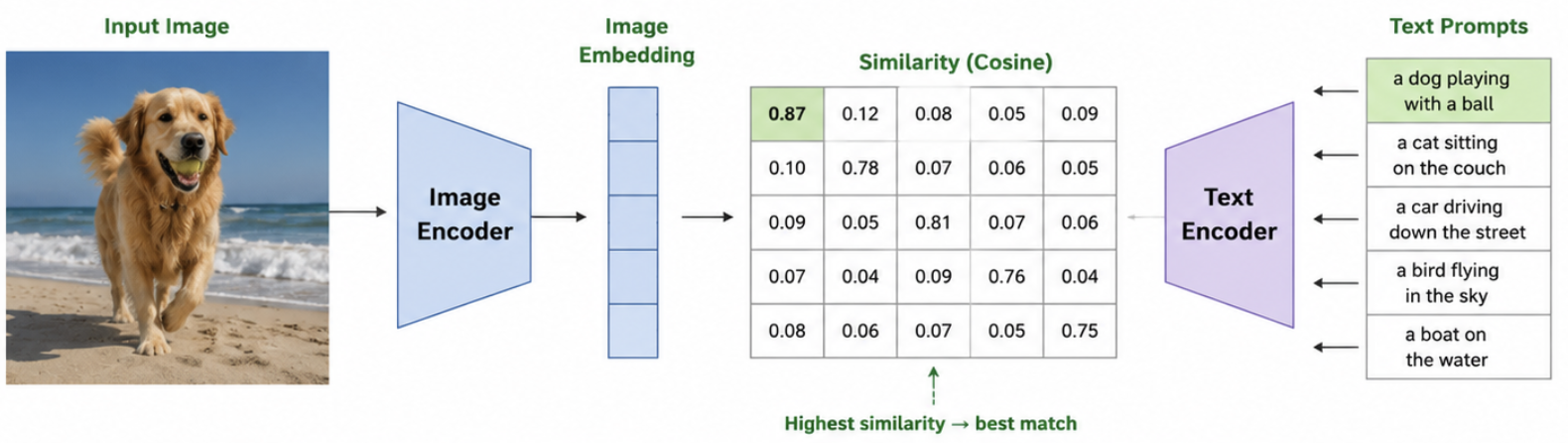
CLIP and Vision-Language Models
Shared Embedding Space
CLIP (Contrastive Language-Image Pretraining) maps images and natural language sentences into the same vector space.
How it works: An Image Encoder processes the image, and a Text Encoder processes text prompts (e.g., "a photo of a cat"). The model calculates the cosine similarity between the image embedding and multiple candidate text embeddings. The text embedding with the highest similarity indicates the predicted class. This enables zero-shot classification and semantic text-based image retrieval without training on fixed class labels.
For image embedding \(\mathbf{v}\) and text embedding \(\mathbf{t}_k\), CLIP compares normalized vectors:
\[
s_k=\operatorname{cos}(\mathbf{v},\mathbf{t}_k)
=\frac{\mathbf{v}^T\mathbf{t}_k}{\lVert\mathbf{v}\rVert_2\lVert\mathbf{t}_k\rVert_2},
\qquad
p_k=\frac{\exp(s_k/T)}{\sum_j\exp(s_j/T)}.
\]
The highest similarity can support zero-shot classification over supplied prompts. CLIP itself is a dual-encoder similarity model, not a caption generator, although CLIP-like encoders can be components inside broader vision-language systems.
Segmentation Overlap Metrics
For predicted mask \(P\) and ground-truth mask \(G\):
\[
\operatorname{IoU}(P,G)=\frac{|P\cap G|}{|P\cup G|},\qquad
\operatorname{Dice}(P,G)=\frac{2|P\cap G|}{|P|+|G|}.
\]
For binary masks, \(\operatorname{Dice}=2\operatorname{IoU}/(1+\operatorname{IoU})\). Both range from 0 (no overlap) to 1 (perfect overlap), assuming a nonempty union.
Model Type Comparisons
Model Type
Output Type
When to Use It
Object Detection
Bounding boxes + class labels
When object location is needed, but boundary shapes are not.
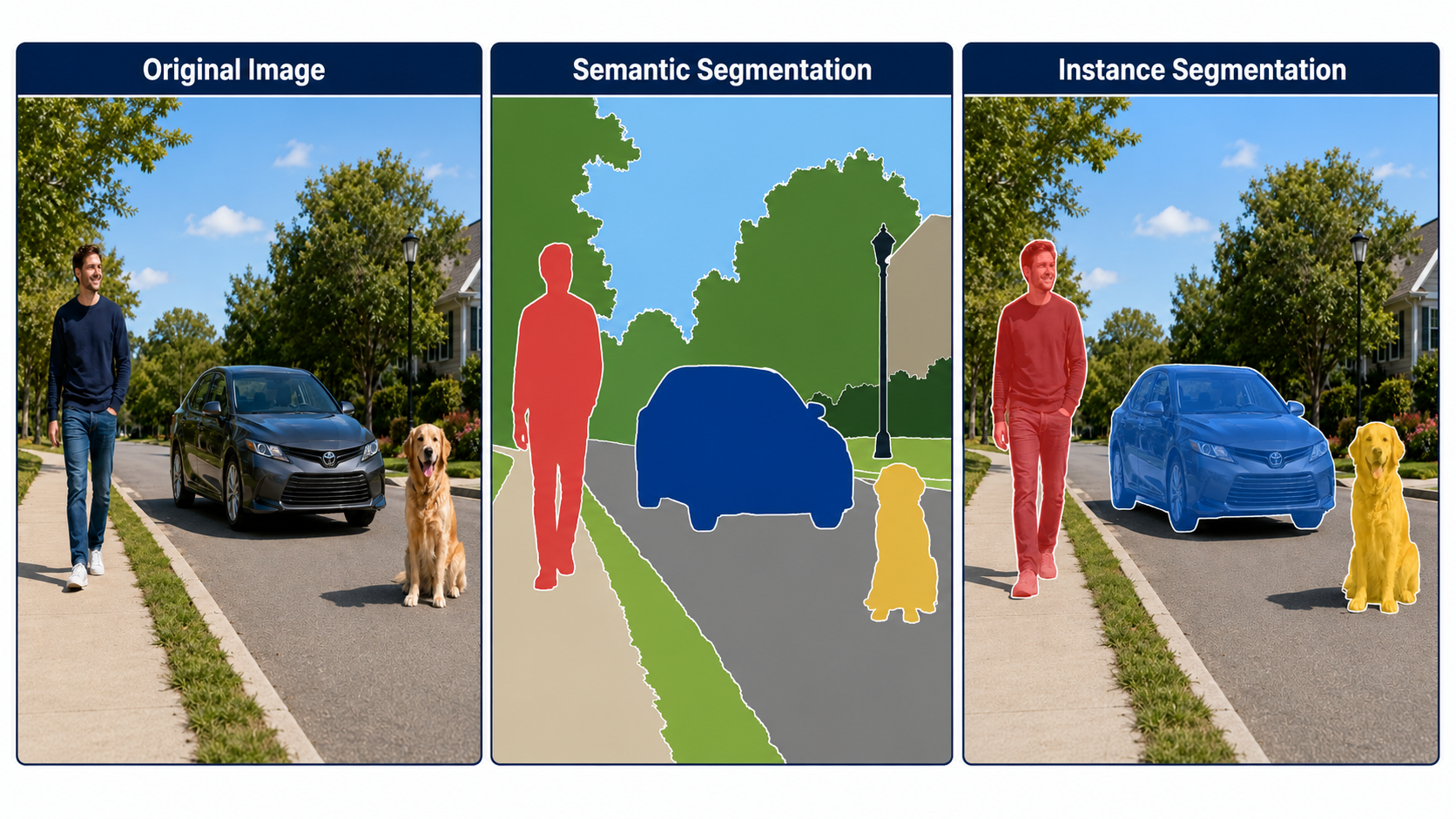
Semantic Segmentation
One class label per pixel (no instance separation)
When every pixel must be labeled (e.g. road vs. sidewalk vs. sky).
Instance Segmentation
Individual pixel mask per object instance
When you must separate different overlapping items of the same class.
Promptable Segmentation
Masks generated via clicks/boxes
For interactive labeling, editing, or unknown object masking.
Vision-Language Models
Image-text similarity vectors
For open-vocabulary recognition, captioning, or search.
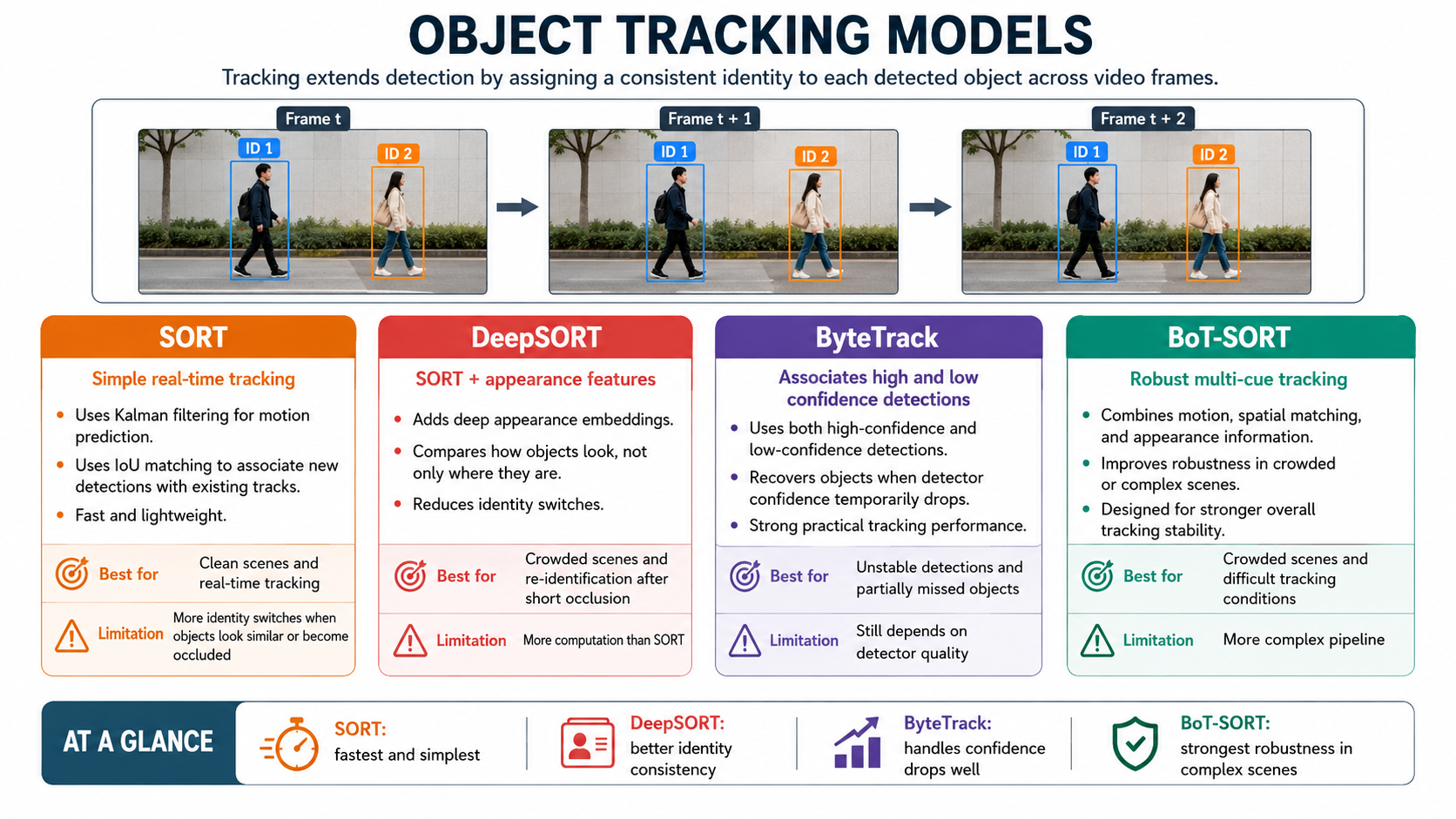
Object Detection vs. Object Tracking
Detection
• Processes frames independently.
• Answers: Where are the objects in this single frame?
• No memory of past frames or object identities.
Tracking
• Links objects across consecutive frames.
• Answers: Which object in this frame is the same as in previous frames?
Fast, lightweight, real-time tracking in clear scenes.
High ID switches when objects overlap or are occluded.
DeepSORT
SORT + Deep Appearance Embeddings.
Crowded scenes; re-identifies objects after short occlusions.
Requires more computation to compute feature vectors.
ByteTrack
Associates both high and low confidence detections.
Unstable detections and recovering partially blocked objects.
Performance is heavily bound to detector quality.
BoT-SORT
Combines motion, spatial overlap, and appearance.
Highly complex tracking under difficult conditions.
Heavy computational pipeline.
Common Multi-Object Tracking Failures
ID Switch
Tracker swaps identities of two nearby or overlapping objects.
Track Fragmentation
One physical object's track is broken into multiple short tracks.
Occlusion Failure
Object gets temporarily hidden, and tracker loses it or assigns a new ID when it reappears.
Metrics across Vision Tasks
Task
Primary Metrics
Description
Classification
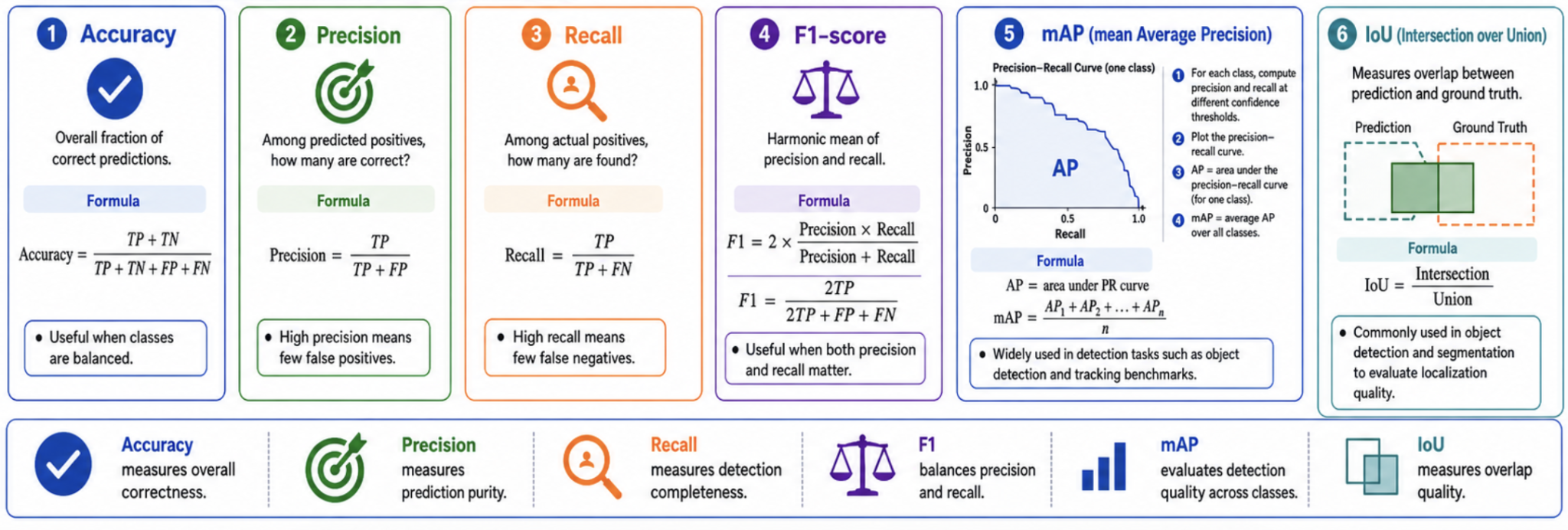
Accuracy, Precision, Recall, F1-score
Overall correctness, fraction of true positives among predictions, fraction of actual positives retrieved.
Detection
mAP (mean Average Precision), IoU
mAP calculates the area under the Precision-Recall curve averaged across all classes.
Segmentation
IoU (Jaccard Index), Dice Coefficient
Measures pixel-level overlap between predicted masks and ground-truth.
Tracking
ID Switches, MOTA, IDF1
Measures consistency of assigned track IDs over time.
Classification and Detection Metrics
\[
\operatorname{Accuracy}=\frac{TP+TN}{TP+TN+FP+FN},\qquad
\operatorname{Precision}=\frac{TP}{TP+FP},\qquad
\operatorname{Recall}=\frac{TP}{TP+FN}
\]
\[
F_1=2\frac{\operatorname{Precision}\cdot\operatorname{Recall}}
{\operatorname{Precision}+\operatorname{Recall}}
=\frac{2TP}{2TP+FP+FN}.
\]
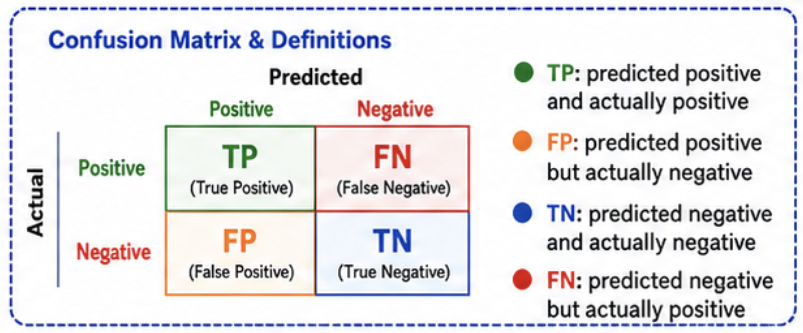
Undefined denominators require an explicit evaluation convention. Accuracy can be misleading for imbalanced classes, so always inspect per-class errors and the confusion matrix.
AP and mAP
Varying the confidence threshold traces a precision-recall curve. Conceptually,
\[
AP_c=\int_0^1 P_c(R)\,dR,\qquad
mAP=\frac{1}{C}\sum_{c=1}^{C}AP_c.
\]
Implementations use discrete/interpolated approximations. Always state the IoU protocol: \(mAP@0.5\) is not the same as COCO-style \(mAP@[0.5:0.95]\), which averages AP over IoU thresholds 0.50 through 0.95 in steps of 0.05.
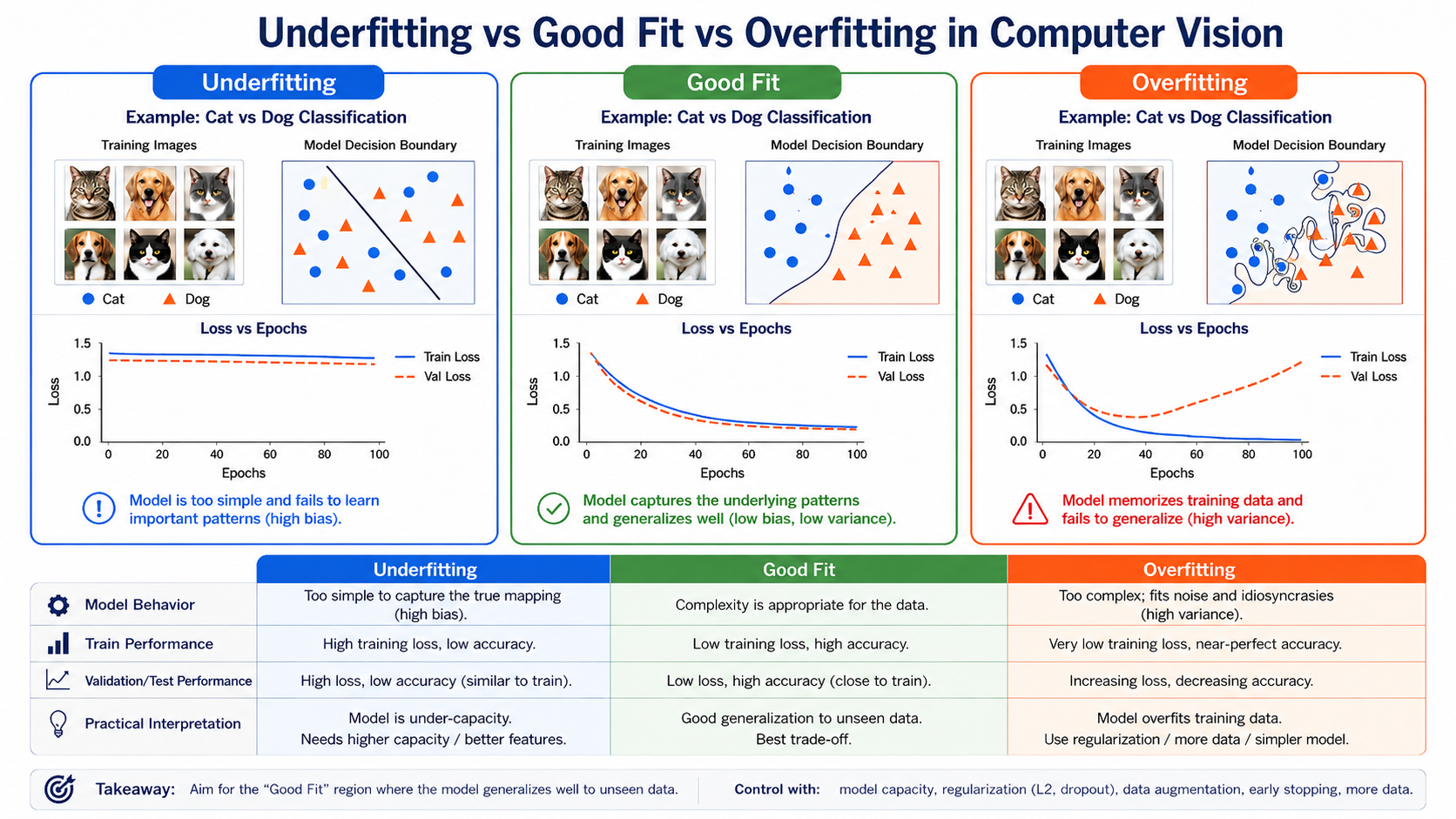
Underfitting vs. Overfitting in Computer Vision
Underfitting
Diagnosis: High train loss & high val loss.
Boundary: Too simple (linear) to separate data.
Fixes: Train longer, use larger model, better features.
Good Fit
Diagnosis: Low train loss & low val loss.
Boundary: Smooth, logical separation curve.
Fixes: Best model trade-off.
Overfitting
Diagnosis: Tiny train loss, high val loss.
Boundary: Highly squiggly, fits noise/points.
Fixes: Augmentation, dropout, early stopping, more data.
Deployment Considerations
• Edge Deployment (Mobile/Embedded): Requires low latency, low power, and small memory footprint. Compact models like MobileNet or YOLO-nano are preferred.
• Cloud Deployment (Server): Allows larger models (e.g. ResNet-152, large transformers) for high accuracy, but introduces network latency, server cost, and data privacy concerns.
Primary Technical References
• COCO official dataset site — dataset tasks and published statistics.
• DETR paper — end-to-end set prediction and bipartite matching without NMS.
• SAM 2 paper — promptable segmentation for images and videos with streaming memory.
• CLIP paper — contrastive image-text pretraining and zero-shot transfer.
1. Bounding Box Intersection over Union (IoU) Calculator
Adjust the positions of Box A (blue) and Box B (red) using the sliders. Watch the overlap (Intersection) and total covered space (Union) update, calculating the IoU.
Box A (Blue) Coordinates:
X / Y
W / H
Box B (Red) Coordinates:
X / Y
W / H
2. YOLO Non-Maximum Suppression (NMS) Simulator
When YOLO detects an object, it outputs multiple overlapping raw bounding boxes. Slide the thresholds to see how NMS filters out below-confidence boxes and suppresses overlapping detections.
Confidence Threshold0.30
NMS Overlap (IoU) Threshold0.45
3. Computer Vision Output Task Selector
Select a computer vision task to see how the model outputs and details change.
Visual Cheat Sheet Summary
50-Question Practice Quiz
This comprehensive practice quiz contains 50 multiple-choice questions loaded directly from the lecture database.
Score: 0 / 0 answered
25-Question True/False Practice
Answer each statement, reveal optional hints, and review the explanation after submitting.
Figures Extracted from the Original Lecture Document
These figures are preserved in their original document order as a complete visual reference. Captions identify the source part and figure number; explanatory text remains in the study-guide sections.
Lecture 12 — original figure 1Lecture 12 — original figure 2Lecture 12 — original figure 3Lecture 12 — original figure 4Lecture 12 — original figure 5Lecture 12 — original figure 6Lecture 12 — original figure 7Lecture 12 — original figure 8Lecture 12 — original figure 9Lecture 12 — original figure 10Lecture 12 — original figure 11Lecture 12 — original figure 12Lecture 12 — original figure 13Lecture 12 — original figure 14